Note
Access to this page requires authorization. You can try signing in or changing directories.
Access to this page requires authorization. You can try changing directories.
Overview
CSP private offers empower software companies and partners in the Cloud Solution Provider (CSP) program to grow their revenue by creating time-bound customized margins that suit each entity's business needs.
Software companies can specify the margin and duration to create a wholesale price for CSP partners who are enrolled in the Microsoft CSP program as a Direct Bill or Indirect Provider. After the CSP partner makes a sale to a customer, Microsoft processes payment to the software company based on the wholesale price, less an agency fee.
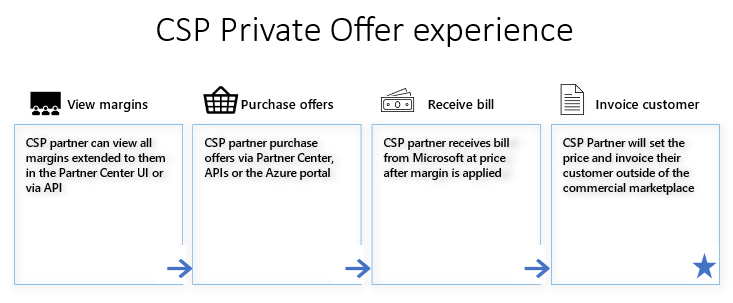
CSP partners can discover margins available in Partner Center. For any sale you make, you receive your bill from Microsoft at the wholesale price. You continue to set your customer price and invoice your customer outside of Microsoft Marketplace. Read more about the CSP partner experience and CSP private offer margins.
The video below showcases how you can sell through partners in the Cloud Solution Provider program and motivate them to sell your solution through Microsoft Marketplace by offering a margin.
Important
The CSP private offers and margins extended from a software company are for the CSP partners, not for the CSP partners' end customers. Customers do not see the CSP margin provided by the software company. CSP private offers will not apply toward an end customers' Microsoft Azure consumption commitment (MACC).
The following example shows the flow of a CSP private offer with an Indirect Provider in the CSP program.

Note
If you publish your offer only to Microsoft Marketplace and opt it in for partners to sell in the CSP program, there might be a delay with your offer displaying for CSP partners to purchase in their portal. If your offer isn't available for your CSP partner to transact, you can contact support.
Prerequisites for CSP private offers
| Partner | Qualification Criteria |
|---|---|
| Software company | - You're enrolled in the Microsoft AI Cloud Partner Program - You're enrolled in Microsoft Marketplace - Must have a transactable offer with a public plan in Microsoft Marketplace (examples: no free, contact me, BYOL offer) - You have CSP partners to sell with using CSP private offers - Your offer is opted into reselling through CSP partners (optional) |
| CSP partner | - You're a Direct Bill or Indirect Provider in CSP program Note: Software company can extend a private offer to CSP direct bill or indirect providers only. Indirect Resellers need to work with their Indirect Providers. CSP partners can check their CSP enrollment status in Partner Center - You're able to manage customer pricing and billing, which the CSP partner outside of Microsoft Marketplace must handle - You manage customers' Azure plans and CSP subscriptions - You have software companies to sell with and willing to share margins using CSP private offers |
Best practices and how to get ready
Software company
- Define your channel strategy and identify CSP partners
- Learn how to resell your offers though CSP partners and opt-in to CSP channel
- Start creating CSP private offers and provide margin to incentivize CSP partners
CSP partner
- Define your sales strategy and identify software companies and products on Microsoft Marketplace
- Understand CSP Marketplace overview
- Request CSP private offers from your software company partners
- View available margins and products included in private offers from software companies
Supported offer types
CSP private offers can be created for the following offer types:
SaaS
Azure Virtual Machines
Azure Applications
Dynamics 365 Business Central apps
Note
Margins are applied on all custom meter dimensions your offer might use. Margins are only applied on the software charges set by you, not on the associated Azure infrastructure hardware charges.
Experience for software companies
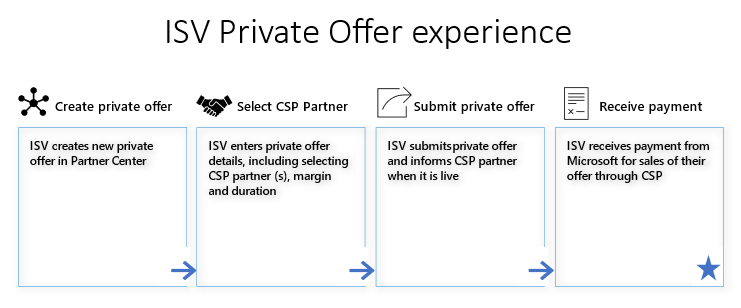
Note
If you publish your offer only to Microsoft Marketplace and opt it in for partners to sell in the CSP program, there might be a delay with your offer displaying for CSP partners to purchase in their portal. If your offer isn't available for your CSP partner to transact, you can contact support.
Private offers dashboard
Create and manage private offers from the Private offers dashboard in the left-nav menu of the Marketplace offers workspace in Partner Center. This dashboard has three tabs:
Customers: Create a private offer for a customer to buy direct from the Azure portal. See private offers.
CSP partners: Create a private offer for a CSP partner. The CSP Partner private offer dashboard opens, which lets you:
- Create new private offers
- View the status of all your private offers
- Clone existing private offers
- Withdraw private offers
- Delete private offers
Multiparty: Create a private offer that includes a channel partner and is sold through the Azure portal. To learn more, see multiparty private offer.
Create a private offer for a CSP partner
- Sign in to Partner Center.
- Select Private offers from the left-nav menu to open the dashboard.
- Select the CSP partners tab.
- Select + New Private offer.
- Enter a private offer name. Use the name to describe your private offer within Partner Center. This name isn't visible to CSP partners.
Offer setup
The offer setup page lets you define private offer terms, notification contact, pricing, and CSP partners.
Private offer terms determine the duration during which your CSP partners can discover and sell your private offer.
- To have your private offer start immediately, choose a Start Date of Accept by date if you want the CSP private offer to start as soon as possible. If all prerequisites are met, your private offer will be made available within 15 minutes after you submit it. If a private offer is extended to an existing customer of a Pay-as-you-go-product, the private price is applicable for the entire month.
- To have your private offer start in an upcoming month, select Specific month and make a selection. The start date for this option is always the first of the month.
- Choose the month for your private offer's End date. The date is always the last date of the month.
Provide up to five emails as Notification Contacts to receive email updates on the status of your private offer. These emails are sent when your private offer moves to Live, Ended, or is Withdrawn.
Configure the percentage-based margins for up to 10 plans in a private offer. Margin can be given at an offer level so it applies to all plans within the offer, or it can be given only for a specific plan. The margin the CSP partner receives is a percentage off your plan's list price in the marketplace.
Select + Add plans to choose the plans you want to provide a private offer for.
Choose to provide a margin at either an offer level or a plan level. For offer levels, all current and future plans under that offer have a margin associated to them. For plan levels, only the plan you selected has a private price associated with it.
Choose up to 10 offers/plans and select Add.
Enter the margin percentage for each item in the pricing table.
Note
Only products that are transactable in Microsoft Marketplace appear in the selection menu.
Select the CSP partners you authorize to sell your private offer.
- Select +Add CSP partners.
- Search for your CSP partners by name/tenant ID. Or, search by applying filters such as regions, skills, or competencies.
- Choose the CSP partners and select Add.
Note
- You can only select CSP partners who are enrolled as Direct Bill or Indirect Provider partners in the CSP program.
- Once your private offer ends, the CSP partners you authorize can continue to sell your Marketplace offer at the list price.
- Private offers can be extended to a maximum of 50 CSP partners tenants.
Optional: To extend a private offer to individual customers of a CSP partner, choose All customers selected for that CSP partner.
- Choose Select customers.
- Under Provide customer tenant ID, select +Add.
- Enter the customer's tenant ID. You can add up to 25 customers for the CSP partner. The CSP partner must provide the customer tenant IDs.
- Select Add.
Important
While you can choose specific customer tenant IDs, the margin extended by the software company is for the CSP partner, not the customers. The CSP partners are responsible for defining the final customer pricing and handle customer billing outside of Microsoft Marketplace.
Review and submit
This page is where you can review all the information you provided. Once submitted, private offers can't be modified. Ensure your information is accurate.
When you're ready, select Submit. You're returned to the dashboard where you can view the status of your private offer. The notification contacts receive an email when the private offer is live.
View private offers status
To view the status of your private offer:
- Select Private offers from the left-nav menu to open the dashboard.
- Select the CSP partners tab.
- Examine the Status column.
The private offer shows one of the following statuses:
Draft: You started the process of creating a private offer but did not submit it.
In Progress: You submitted a private offer and it's currently being processed by Microsoft.
Live: Your private offer is discoverable and may be purchased by CSP partners.
Ended: Your private offer expired or passed its end date.
Important
Unlike customer private offers or multiparty private offers, CSP private offers don't require a discrete private offer acceptance step.
Clone a private offer
Cloning a private offer helps you create a new private offer quickly.
- Select Private offers from the left-nav menu to open the dashboard.
- Select the CSP partners tab.
- Check the box of the private offer you want to clone.
- Select Clone.
- Enter a new private offer name.
- Select Clone.
- Edit the details on the Offer Setup page as needed.
- Submit the new private offer.
Withdraw a private offer
When you withdraw a private offer, your CSP partners will immediately no longer receive a margin and all future purchases are at the list price.
Important
Private offers can only be withdrawn if no CSP partner sold it to a customer.
To withdraw a private offer:
- Select Private offers from the left-nav menu to open the dashboard.
- Select the CSP partners tab.
- Check the box of the private offer you want to withdraw.
- Select Withdraw.
- Select Request withdraw.
- Your notification contacts receive an email when your private offer is successfully withdrawn.
Delete a private offer
To delete a private offer in draft state:
- Select Private offers from the left-nav menu to open the dashboard.
- Select the CSP partners tab.
- Check the box of the private offer you want to delete.
- Select Delete.
- Select Confirm.
Find more details
While your private offer publish is in progress, you can view more details on its current state:
- Select Private offers from the left-nav menu to open the dashboard.
- Select the CSP partners tab.
- Select the In Progress link of the private offer in the Status column.
The details show one of the following statuses:
- CSP partner authorization in progress: We're currently authorizing the given CSP partner to be able to sell your offer.
- Private offer publish in progress: We're currently publishing the given CSP partner's private price.
- Live: The private offer is now Live for this CSP partner.
After CSP private offer creation
Check the status of private offers
After you submit the offer, you can check the status of the private offer. Unlike private offers or multiparty private offers, there's no private offer acceptance process from either the CSP partner or end customer. CSP partners check the margins provided by you in Partner Center and sell your products to their customers.
For SaaS, be sure to configure and activate the offers to complete purchases
The marketplace purchase completes after software company configuration and activation of the subscription. For more information, review this Managing the SaaS subscription life cycle document.
Software companies can track and monitor sales using reporting in the Insights workspace of Partner Center
- Analytics: Order and revenue information for CSP transactions and private offers are available in the Marketplace insights dashboards, reports, and through programmatic access. You can filter Sales Channel = CSP.
- Payouts: Sales through Marketplace and private offers are in Earnings, under earnings and reports. For more information about payout schedule, visit Marketplace payout schedule documentation.
Experience for CSP partners
Best practices to work on CSP private offers
| Task | Key steps | Resources |
|---|---|---|
| Discover offers | Find available ISV offers/products, pricing, and product details | Discover Marketplace offers |
| View margins | Check the margins in Partner Center extended from software companies using CSP private offers | ISV-to-CSP private offers (margin sharing) |
| Purchase / manage subscriptions |
Find price list for Marketplace offers | Check pricing |
| Purchase / manage subscriptions |
Purchase and activate an offer for your customer | Purchase Marketplace offers |
| Purchase / manage subscriptions |
Learn how to cancel or renew a subscription or add or remove licenses | Manage Marketplace offers |
| Billing | Handle billing to customers | Billing for Marketplace offers |
| Contracts and the responsibilities | Learn about support roles and responsibilities | Understand support |
| Contracts and the responsibilities | Learn about contracts and the responsibilities of CSP partners and ISVs | Understand contracting |
| APIs | Understand Partner Center API scenarios that let you programmatically manage customer accounts | Partner Center API scenarios - Partner app developer |
CSP partners purchase experience of marketplace offers
CSP partners can purchase the software company's product offers under the customer's CSP Azure subscription that they manage.
- For SaaS or Business Central offers, CSP partners can purchase the products in Partner Center. For VMs/Azure apps, CSP can purchase in Azure portal.
- CSP can also sell through their own storefront, integrating with Microsoft APIs. CSP partners set end customer pricing and sell to customers outside of Microsoft Marketplace.
- For more information, visit Purchase Marketplace offers.
Provisioning and activation
SaaS offers: The end customer or CSP needs to visit the software company's website after purchase and enter the required information. Then, software company configures and activates the product to complete the purchase.
Non-SaaS offers: You can provision non-SaaS offers in the Azure portal after you purchase.
Important
For CSP private offers, there's no customer Private Offer Management experience in the Azure portal for private offer acceptance and purchase, unlike customer private offers or multiparty private offers. Customers don't see discounted pricing through the CSP private offer purchase experience in the Microsoft commercial marketplace. CSP partners should handle reseller and customer custom pricing and billing outside of Microsoft Marketplace.
| Offer types | CSP private offers | CSP purchase in Partner Center (UX/API/pricelist) |
CSP (or customer) purchase in Azure portal |
Provisioning & Activation |
|---|---|---|---|---|
| SaaS | Yes | Yes | Yes | Software company landing page |
| Virtual Machines | Yes | No | Yes | Azure portal |
| Azure Applications | Yes | No | Yes | Azure portal |
| Dynamics Business Central | Yes | Yes | Yes | Microsoft 365 admin center |
Note
If the CSP partner extends admin or contributor rights to an end customer on the CSP subscription, the end customer can go into the Azure portal and view and purchase public product offers at retail pricing on the CSP subscription.
The customer doesn't see the resources unless the CSP partner gives them access.
If the CSP wants to offer custom pricing for the end-customer or reseller, they need to handle it on the backend, outside of Microsoft Marketplace.
If there's a valid CSP private offer for the product under the CSP tenant, the CSP partner can still get the margin extended from the software company for the customer's purchase.
If the end customer purchases for themselves, Microsoft still bills the CSP. The CSP then bills the end customer outside of Microsoft Marketplace.
Partner Center APIs to automate process
CSP partners can automate their operational process using APIs. For more information, please visit CSP Marketplace overview and Partner Center API scenarios.
Customer experience
CSP partners operating outside of Microsoft Marketplace own the end customer's purchasing and billing experience.
CSP partners have full control of the customer experience and should manage reseller and customer custom pricing and billing outside of Microsoft Marketplace.
For CSP private offers, there's no private offer management experience in the Azure portal.
No CSP private offer acceptance step is required (unlike with private offers or multiparty private offers).
Margins from a software company using a CSP private offer are intended for CSP partners, not their customers.
Customers don't see discounted pricing through the CSP private offer purchase experience in Microsoft Marketplace.
Only if the CSP partner extends admin or contributor rights to an end customer in the Azure portal, the end customer can view and purchase public product offers at retail price on the CSP subscription.
Related content
Further reading
Frequently asked questions about configuring CSP private offers
Software companies: How to resell your offers though CSP partners