applies to: SQL Server
每个启用Azure Arc的服务器都包含一组应用于该服务器上安装的所有SQL Server实例的属性。 在计算机上安装Azure扩展SQL Server后,可以配置这些属性。 但是,仅当安装了SQL Server实例或实例时,这些属性才会生效。 在 Azure 门户的 概述 窗格中,启用了 Azure Arc 的 SQL Server 显示出 SQL Server 配置如何影响特定实例。
先决条件
你在组织创建的至少一个 Azure 订阅中具有 Contributor 角色。 了解如何创建新的计费订阅。
您在包含将注册 SQL Server 实例的资源组中担任 贡献者角色。 有关详细信息,请参阅 Managed Azure 资源组。
Microsoft.AzureArcData和Microsoft.HybridCompute资源提供程序在用于 SQL Server 即用即付计费的每个订阅中注册。
注册资源提供程序
若要注册资源提供程序,可使用以下任一种方法:
- 选择 订阅。
- 选择订阅。
- 在“设置”下,选择“资源提供程序”。
- 搜索
Microsoft.AzureArcData和Microsoft.HybridCompute,然后选择 Register。
修改SQL Server配置
可以使用Azure门户、Azure PowerShell或Azure CLI将特定Azure Arc服务器上的所有或某些配置设置更改为所需状态。
若要使用单个命令修改较大范围(例如资源组、订阅或多个订阅)的SQL Server配置,请使用 modify-license-type.ps1 PowerShell 脚本。 它作为开源SQL Server示例发布,其中包含分步说明。
建议从Azure Cloud Shell运行脚本,因为:
- 它具有预安装所需的Azure PowerShell模块。
- 它自动对你进行身份验证。
有关详细信息,请参阅
可通过两种方法在 Azure 门户中配置SQL Server主机:
打开已启用Azure Arc SQL Server Overview窗格,然后选择SQL Server配置。

打开已启用Azure Arc的 SQL Server Overview 窗格,然后选择 Properties。 在 SQL Server 配置下,选择需要修改的设置:
- 许可证类型
- ESU 订阅
- 自动修补
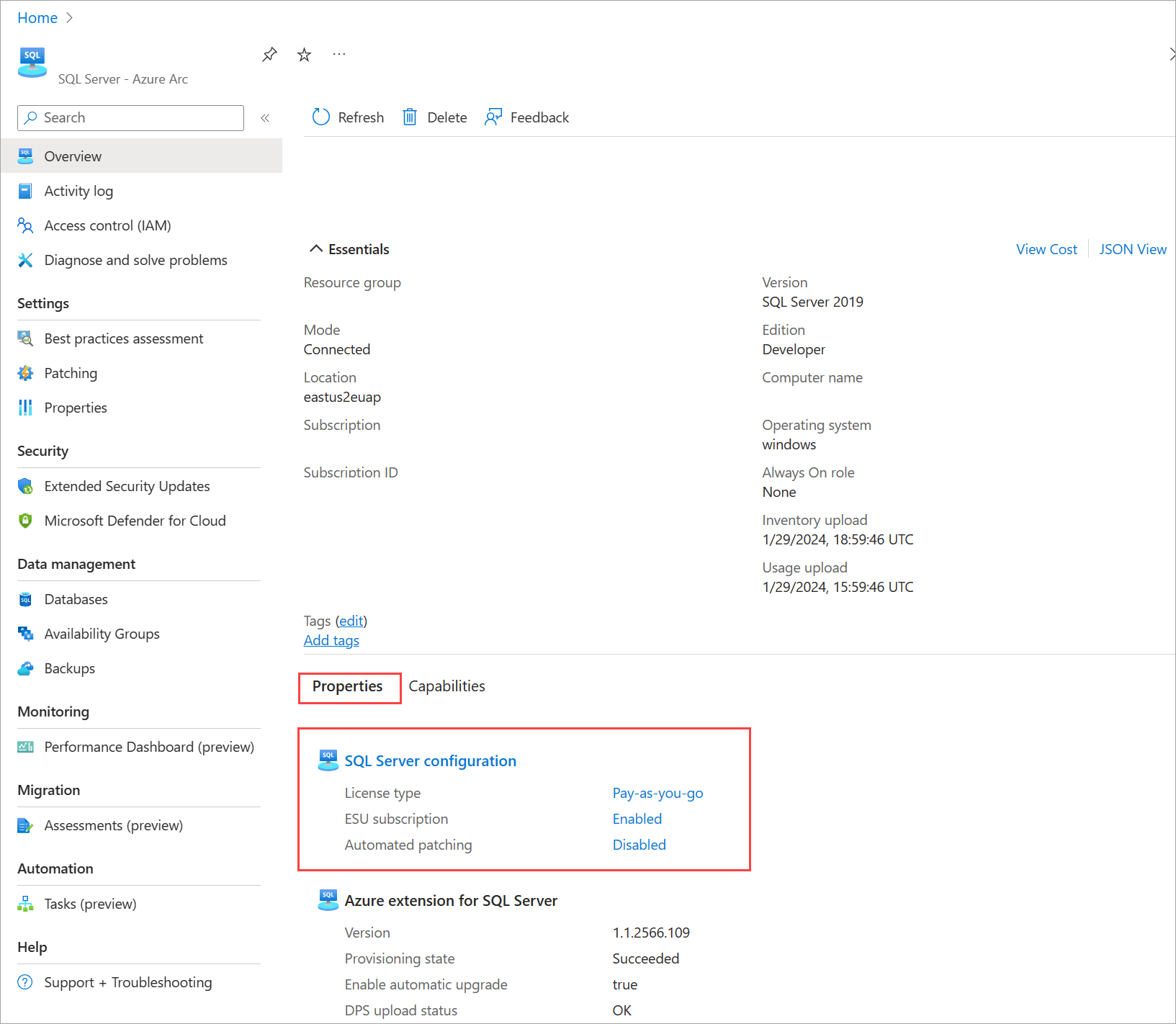

设置许可证类型属性
选择一种许可证类型。 有关说明,请参阅许可证类型。
注意
在 Linux 上,某些配置功能不可用,包括被动实例检测和连接的用户验证。 在 Linux 上配置 PAYG 计费时,无论其 HA/DR 角色如何,所有实例都会按活动方式计费。 有关详细信息,请参阅 管理许可和计费。
使用物理核心许可证
如果要配置虚拟机(VM),则选中“使用物理核心许可证复选框,并使用无限制的虚拟化权益来许可SQL Server软件或 SQL 订阅。 它将把主机配置属性 UsePhysicalCoreLicense 设置为 True。 如果选中此复选框,则物理核心(p-core)许可证具有优先权,SQL Server软件的成本将被取消。
重要
如果 P 核心许可证配置了即用即付计费计划,则所选“许可证类型”应设置为“即用即付”。 此选择不会在虚拟机级别触发额外费用,但会在 P 核心许可证取消激活或删除的情况下确保许可和计费不中断。
订阅扩展安全更新
注意
Azure VM 上SQL Server 2016 的扩展安全更新(ESU)的价格结构正在更改。 有关详细信息,请参阅 ESU 定价博客。
你可以订阅单个主机的扩展安全更新程序 (ESU)。 若要获得 ESU 订阅资格,主机必须将“许可证类型”设置为“即用即付”或“具有软件保障的许可证”。 通过此选项,可在主机是虚拟机时使用 vCPU(v 核心)进行订阅,或者在主机是不使用虚拟机运行的物理服务器时使用物理核心进行订阅。
选择“订阅扩展安全更新程序”。 它将把主机配置属性 EnableExtendedSecurityUpdates 设置为 True。 选择“保存”后,将激活订阅。
有关 ESU 许可选项的详细信息,请参阅在生产环境中订阅扩展安全更新程序。
注意
与 P 核心 ESU 许可证不同,在为主机订阅 ESU 时,无需定义每台计算机的可计费核心数量。 Azure 扩展组件用于 SQL Server 检测主机的大小、主机的类型(虚拟或物理),以及 SQL Server 的版本。 扩展程序根据这些参数计费。
启用 ESU 后,则在取消 ESU 订阅之前,主机的“许可证类型”值无法更改为“仅限许可证”。
使用物理核心 ESU 许可证
如果你要配置虚拟机,并且利用无限制虚拟化权益来启用 ESU 订阅,则请选中“使用物理核心 ESU 许可证”复选框。 它将把 UseEsuPhysicalCoreLicense 设置为 true。
如果选中该复选框,p-core许可证将具有最高优先级,VM级别的SQL Server ESU费用将被取消。
取消订阅扩展安全更新程序
您可以随时取消通过 Azure Arc 启用的扩展安全更新。 取消后会立即停止 ESU 费用。 选择“取消订阅扩展安全更新程序”。 选择“保存”后,订阅将结束。
添加到“排除的实例”列表
可以从Azure策略或自动载入流程驱动的大规模载入操作中排除某些实例。 要从这些操作中排除特定实例,请将实例名称添加到“跳过实例”列表中。 有关大规模引入选项的详细信息,请参阅 由 Azure Arc 启用的 SQL Server 部署选项。
注意
不能排除使用按需付费的SQL Server实例或关联服务。
保存更新的配置
验证许可证类型、ESU 设置以及要排除的任何实例后,选择“保存”以应用更改。
重要
列出的供应商的基础结构不支持 SQL Server 软件或 SQL Server ESU 订阅的无限制的虚拟化特权。 如果在列出的提供商的 VM 上运行SQL Server,并选择此选项,则您的意图将被忽略,而您需要为 VM 的 vCPU 付费。
使用Azure Policy大规模订阅扩展安全更新
可以通过使用名为将符合条件的 Arc 启用的 SQL Server 实例订阅扩展安全更新的 Azure Policy 定义,在多个 Azure Arc 启用的机器上订阅 ESU。
当您将此策略定义分配到您选择的范围时,它会在所有已安装 Azure SQL Server 扩展的 Azure Arc 启用的计算机上启用扩展安全更新 (ESU)。 如果其中任一计算机具有限定SQL Server实例,ESU 订阅将立即激活。
按照以下步骤激活该策略:
在 Azure 门户中,转到 Azure Policy,然后选择 Definitions。
搜索符合条件的启用 Arc 的 SQL Server 实例以订阅扩展安全更新,然后右键单击该策略。
选择“分配策略”。
选择订阅和资源组(可选)作为作用域。
确保“策略实施”设置为“已启用”。
在“参数”选项卡上,将“启用扩展安全更新”的值设置为“True”。
在“修正”选项卡上:
- 选择“创建修正任务”以将该策略应用到现有的资源。 如果未选择此选项,该策略将仅应用到新创建的资源。
- 选择 创建托管身份,然后选择 系统分配的托管身份(推荐)或 用户分配的托管身份, 具有 用于 SQL Server 部署的 Azure 扩展和 读取器 权限。
- 选择身份的位置。
选择“查看 + 创建” 。
选择“创建”。
查询SQL Server配置
可以使用 Azure Resource Graph 查询所选范围内SQL Server配置设置。 请参阅以下示例。
按许可证类型获取计数
此示例将按许可证类型返回计数:
resources
| where type == "microsoft.hybridcompute/machines/extensions"
| where properties.type in ("WindowsAgent.SqlServer","LinuxAgent.SqlServer")
| extend licenseType = iff(properties.settings.LicenseType == '', 'Configuration needed', properties.settings.LicenseType)
| summarize count() by tostring(licenseType)
标识许可证类型未定义的实例
此查询将返回许可证类型为 null 的实例列表:
resources
| where type == "microsoft.hybridcompute/machines/extensions"
| where properties.type in ("WindowsAgent.SqlServer","LinuxAgent.SqlServer")
| where isnull(properties.settings.LicenseType)
| project ['id'], resourceGroup, subscriptionId
列出每个SQL Server实例的配置详细信息
此查询标识有关每个实例的许多详细信息,包括许可证类型、ESU 设置和启用的功能:
resources
| where type == "microsoft.hybridcompute/machines"
| where properties.detectedProperties.mssqldiscovered == "true"
| extend machineIdHasSQLServerDiscovered = id
| project name, machineIdHasSQLServerDiscovered, resourceGroup, subscriptionId
| join kind= leftouter (
    resources
    | where type == "microsoft.hybridcompute/machines/extensions"    | where properties.type in ("WindowsAgent.SqlServer","LinuxAgent.SqlServer")
    | extend machineIdHasSQLServerExtensionInstalled = iff(id contains "/extensions/WindowsAgent.SqlServer" or id contains "/extensions/LinuxAgent.SqlServer", substring(id, 0, indexof(id, "/extensions/")), "")
    | project Extension_State = properties.provisioningState,
    License_Type = properties.settings.LicenseType,
    ESU = iff(notnull(properties.settings.enableExtendedSecurityUpdates), iff(properties.settings.enableExtendedSecurityUpdates == true,"enabled","disabled"), ""),
    Extension_Version = properties.instanceView.typeHandlerVersion,
    Excluded_instances = properties.ExcludedSqlInstances,
    Purview = iff(notnull(properties.settings.ExternalPolicyBasedAuthorization),"enabled",""),
    Entra = iff(notnull(properties.settings.AzureAD),"enabled",""),
    BPA = iff(notnull(properties.settings.AssessmentSettings),"enabled",""),
    machineIdHasSQLServerExtensionInstalled)on $left.machineIdHasSQLServerDiscovered == $right.machineIdHasSQLServerExtensionInstalled
| where isnotempty(machineIdHasSQLServerExtensionInstalled)
| project-away machineIdHasSQLServerDiscovered, machineIdHasSQLServerExtensionInstalled
列出启用了Azure Arc的服务器,其中包含SQL Server实例
此查询用于标识启用 Azure Arc 的服务器,并在其中发现 SQL Server 实例:
resources
| where type == "microsoft.hybridcompute/machines"
| where properties.detectedProperties.mssqldiscovered == "true"
//| summarize count()
此查询返回Azure Arc已启用SQL Server实例但未安装Azure Arc SQL Server扩展的服务器。 此查询仅适用于Windows服务器。
resources
| where type == "microsoft.hybridcompute/machines"
| where properties.detectedProperties.mssqldiscovered == "true"
| project machineIdHasSQLServerDiscovered = id
| join kind= leftouter (
    resources
    | where type == "microsoft.hybridcompute/machines/extensions"
    | where properties.type == "WindowsAgent.SqlServer"
    | project machineIdHasSQLServerExtensionInstalled = substring(id, 0, indexof(id, "/extensions/WindowsAgent.SqlServer")))
on $left.machineIdHasSQLServerDiscovered == $right.machineIdHasSQLServerExtensionInstalled
| where isempty(machineIdHasSQLServerExtensionInstalled)
| project machineIdHasSQLServerDiscoveredButNotTheExtension = machineIdHasSQLServerDiscovered
有关Azure Resource Graph查询的更多示例,请参阅 Starter Resource Graph 查询示例。
列出订阅了 ESU 的已启用 Azure Arc 的 SQL Server 实例
以下示例演示如何查看所有符合条件的 SQL Server 2014 (12.x) 实例及其 ESU 订阅状态:
resources
| where type == 'microsoft.azurearcdata/sqlserverinstances'
| extend Version = properties.version
| extend Edition = properties.edition
| extend containerId = tolower(tostring (properties.containerResourceId))
| where Version in ("SQL Server 2014")
| where Edition in ("Enterprise", "Standard")
| where isnotempty(containerId)
| project containerId, SQL_instance = name, Version, Edition
| join kind=inner (
    resources
    | where type == "microsoft.hybridcompute/machines"
    | extend machineId = tolower(tostring(id))
    | project machineId, Machine_name = name
)
on $left.containerId == $right.machineId
| join kind=inner (
    resources
    | where type == "microsoft.hybridcompute/machines/extensions"
    | where properties.type in ("WindowsAgent.SqlServer","LinuxAgent.SqlServer")
    | extend machineIdHasSQLServerExtensionInstalled = tolower(iff(id contains "/extensions/WindowsAgent.SqlServer" or id contains "/extensions/LinuxAgent.SqlServer", substring(id, 0, indexof(id, "/extensions/")), ""))
    | project machineIdHasSQLServerExtensionInstalled,
     Extension_State = properties.provisioningState,
     License_Type = properties.settings.LicenseType,
     ESU = iff(notnull(properties.settings.enableExtendedSecurityUpdates), iff(properties.settings.enableExtendedSecurityUpdates == 'true',"ENABLED","disabled"), "disabled"),
     Extension_Version = properties.instanceView.typeHandlerVersion
)
on $left.machineId == $right.machineIdHasSQLServerExtensionInstalled
| project-away machineId, containerId, machineIdHasSQLServerExtensionInstalled
列出托管可计费SQL Server实例的启用了Azure Arc的服务器
此查询标识托管SQL Server实例的连接计算机(虚拟或物理),这些计算机是计费的,或者需要SQL Server软件的许可证。 它提供了SQL Server配置的详细信息,包括许可证类型、ESU 设置、v 核心或 p 核心的大小以及其他相关参数。
resources
| where type =~ 'Microsoft.HybridCompute/machines'
| extend status = tostring(properties.status)
| where status =~ 'Connected'
| extend machineID = tolower(id)
| extend VMbyManufacturer = toboolean(iff(
    properties.detectedProperties.manufacturer contains_cs "VMware" or
    properties.detectedProperties.manufacturer contains_cs "QEMU" or
    properties.detectedProperties.manufacturer contains_cs "Amazon EC2" or
    properties.detectedProperties.manufacturer contains_cs "OpenStack" or
    properties.detectedProperties.manufacturer contains_cs "Hetzner" or
    properties.detectedProperties.manufacturer contains_cs "Mission Critical Cloud" or
    properties.detectedProperties.manufacturer contains_cs "DigitalOcean" or
    properties.detectedProperties.manufacturer contains_cs "UpCloud" or
    properties.detectedProperties.manufacturer contains_cs "oVirt" or
    properties.detectedProperties.manufacturer contains_cs "Alibaba" or
    properties.detectedProperties.manufacturer contains_cs "KubeVirt" or
    properties.detectedProperties.manufacturer contains_cs "Parallels" or
    properties.detectedProperties.manufacturer contains_cs "Bochs" or
    properties.detectedProperties.manufacturer contains_cs "XEN", 1, 0))
| extend VMbyModel = toboolean(iff(
    properties.detectedProperties.model contains_cs "OpenStack" or
    properties.detectedProperties.model contains_cs "Droplet" or
    properties.detectedProperties.model contains_cs "oVirt" or
    properties.detectedProperties.model contains_cs "Hypervisor" or
    properties.detectedProperties.model contains_cs "Virtual" or
    properties.detectedProperties.model contains_cs "BHYVE" or
    properties.detectedProperties.model contains_cs "KVM", 1, 0))
| extend GoogleVM = toboolean(iff(
    properties.detectedProperties.manufacturer contains_cs "Google" and
    properties.detectedProperties.model contains_cs "Google Compute Engine", 1, 0))
| extend NutanixVM = toboolean(iff(
    properties.detectedProperties.manufacturer contains_cs "Nutanix" and
    properties.detectedProperties.model contains_cs "AHV", 1, 0))
| extend MicrosoftVM = toboolean(iff(
    properties.detectedProperties.manufacturer contains_cs "Microsoft Corporation" and
    properties.detectedProperties.model contains_cs "Virtual Machine", 1, 0))
| extend billableCores = iff(
    VMbyManufacturer or VMbyModel or GoogleVM or NutanixVM or MicrosoftVM,
    properties.detectedProperties.logicalCoreCount,
    properties.detectedProperties.coreCount)
| join kind=leftouter (
    resources
    | where type =~ 'Microsoft.HybridCompute/machines/extensions'
    | where name == 'WindowsAgent.SqlServer' or name == 'LinuxAgent.SqlServer'
    | extend extMachineID = substring(id, 0, indexof(id, '/extensions'))
    | extend extensionId = id
) on $left.id == $right.extMachineID
| join kind=inner (
    resources
    | where type =~ 'microsoft.azurearcdata/sqlserverinstances'
    | extend sqlVersion = tostring(properties.version)
    | extend sqlEdition = tostring(properties.edition)
    | extend is_Enterprise = toint(iff(sqlEdition == "Enterprise", 1, 0))
    | extend sqlStatus = tostring(properties.status)
    | extend licenseType = tostring(properties.licenseType)
    | where sqlEdition in ('Enterprise', 'Standard')
    | where licenseType !~ 'HADR'
    | extend ArcServer = tolower(tostring(properties.containerResourceId))
    | order by sqlEdition
) on $left.machineID == $right.ArcServer
| where isnotnull(extensionId)
| summarize Edition = iff(sum(is_Enterprise) > 0, "Enterprise", "Standard") by machineID, name, resourceGroup, subscriptionId, Status = tostring(properties.status), Model = tostring(properties.detectedProperties.model), Manufacturer = tostring(properties.detectedProperties.manufacturer), License_Type = tostring(properties1.settings.LicenseType), ESU = iff(notnull(properties1.settings.enableExtendedSecurityUpdates), iff(properties1.settings.enableExtendedSecurityUpdates == true, "enabled", "not enabled"), "not enabled"), OS = tostring(properties.osName), Uses_UV = tostring(properties1.settings.UsePhysicalCoreLicense.IsApplied), Cores = tostring(billableCores), Version = sqlVersion, HostType = iff(VMbyManufacturer or VMbyModel or GoogleVM or NutanixVM or MicrosoftVM, "VM", "Physical")
| summarize by name, subscriptionId, resourceGroup, Model, Manufacturer, HostType, License_Type, ESU, OS, Cores, Status
| project Name = name, Model, Manufacturer, HostType, OperatingSystem = OS, Status, HostLicenseType = License_Type, ESU, BillableCores = Cores, SubscriptionID = subscriptionId, ResourceGroup = resourceGroup
| order by Name asc
管理SQL Server的无限制虚拟化权益
若要启用无限制虚拟化,Azure Arc启用SQL Server支持特殊资源类型:SQLServerLicense。 可以使用此资源来许可安装了SQL Server实例的许多虚拟机。 有关许可模型的详细信息,请参阅 License SQL Server实例,其中包含无限制虚拟化。
先决条件
基于角色的访问控制 (RBAC) 角色包含以下权限:
Microsoft.AzureArcData/SqlLicenses/readMicrosoft.AzureArcData/SqlLicenses/writeMicrosoft.Management/managementGroups/readMicrosoft.Resources/subscriptions/readMicrosoft.Resources/subscriptions/resourceGroups/readMicrosoft.Support/supporttickets/write
创建SQL Server许可证
若要创建SQL Server许可证资源,请使用以下方法之一:
- 选择 Azure Arc。
- 在 Data Services 下,选择 SQL Server 许可证。
- 选择“+创建”。
- 选择SQL Server物理核心许可证。
- 完成创建向导。
更新SQL Server许可证资源
若要更改SQL Server许可证属性(例如,在以后激活它),请使用以下方法之一:
- 选择 Azure Arc。
- 在 Data Services 下,选择 SQL Server 许可证。
- 选择许可证。
- 在“管理”下选择“配置”。
- 进行更改,然后选择“应用”。
管理 P 核心许可证范围内的资源
可以使用以下步骤管理特定SQL Server物理核心许可证范围内的资源:
- 选择 Azure Arc。
- 在 Data Services 下,选择 SQL Server 许可证。
- 选择许可证。
- 在“管理”下选择“范围中的资源”。
如果未将特定资源配置为使用此许可证(“应用物理核心许可证”列显示“否”),则可以更改:
- 在列表中选择特定资源。
- 选择应用许可证。
- 阅读免责声明并选择“确认”。
列出SQL Server许可证范围内启用Azure Arc的服务器
此查询列出了许可证范围内启用的所有Azure Arc服务器以及每个服务器的相关属性:
resources
        | where type =~ 'Microsoft.HybridCompute/machines'
        | where ('${scopeType}'!= 'Subscription' or subscriptionId == '${subscription}')
        | where ('${scopeType}' != 'ResourceGroup' or (resourceGroup == '${resourceGroup.toLowerCase()}' and subscriptionId == '${subscription}'))
        | extend status = tostring(properties.status)
        | where status =~ 'Connected'
        | join kind = leftouter
        (
        resources
        | where type =~ 'Microsoft.HybridCompute/machines/extensions'
        | where name == 'WindowsAgent.SqlServer' or name == 'LinuxAgent.SqlServer'
        | extend machineId = substring(id, 0, indexof(id, '/extensions'))
        | extend extensionId = id
        )
        on $left.id == $right.machineId
        | where isnotnull(extensionId)
        | project id, name, properties.status, resourceGroup, subscriptionId, Model = properties.detectedProperties.model, Manufacturer = properties.detectedProperties.manufacturer, kind, OSE = properties.osName, License_applied = properties1.settings.UsePhysicalCoreLicense.IsApplied
        |order by name asc
管理 SQL Server ESU 订阅的无限制虚拟化权益
若要为 ESU 订阅启用无限制虚拟化,Azure Arc启用SQL Server支持特殊资源类型:SqlServerEsuLicenses。 可以使用此资源为一组物理主机启用 ESU 订阅,这些主机运行着数量不限的虚拟机,这些虚拟机上运行超出支持期限的 SQL Server 实例。 有关许可模型的详细信息,请参阅 通过使用物理核心与无限制虚拟化来订阅 SQL Server 的扩展安全更新 (ESU)。
先决条件
你的 RBAC 角色包含以下权限:
Microsoft.AzureArcData/SqlLicenses/readMicrosoft.AzureArcData/SqlLicenses/writeMicrosoft.Management/managementGroups/readMicrosoft.Resources/subscriptions/readMicrosoft.Resources/subscriptions/resourceGroups/readMicrosoft.Support/supporttickets/write
创建SQL Server ESU 许可证资源
若要创建SQL Server ESU 许可证资源,请使用以下方法之一:
- 选择 Azure Arc。
- 在 Data Services 下,选择 SQL Server ESU 许可证。
- 选择“+创建”。
- 完成创建向导。
更新SQL Server ESU 许可证资源
若要更改 SQL Server ESU 许可证属性(例如终止订阅),请使用以下方法之一:
- 选择 Azure Arc。
- 在 Data Services 下,选择 SQL Server ESU 许可证。
- 选择许可证。
- 在“管理”下选择“配置”。
- 进行更改,然后选择“应用”。
管理 ESU P 核心许可证范围内的资源
可以使用以下步骤管理特定SQL Server ESU 许可证范围内的资源:
- 选择 Azure Arc。
- 在 Data Services 下,选择 SQL Server ESU 许可证。
- 选择许可证。
- 在“管理”下选择“范围中的资源”。
此视图仅显示范围内承载服务外SQL Server实例的已连接计算机,该实例的版本与所管理的 p-core ESU 许可证版本匹配。 如果未将特定资源配置为使用此许可证(“已应用物理核心许可证”列显示“否”),则可以更改:
- 在列表中选择特定资源。
- 选择“订阅 ESU”以订阅或选择“取消订阅 ESU”以取消订阅。
- 阅读免责声明并选择“确认”。
在SQL Server ESU许可范围内列出已启用Azure Arc的服务器
此查询列出了许可证范围内启用的所有Azure Arc服务器以及每个服务器的相关属性:
resources
        | where type =~ 'Microsoft.HybridCompute/machines'
        | where ('${scopeType}'!= 'Subscription' or subscriptionId == '${subscription}')
        | where ('${scopeType}' != 'ResourceGroup' or (resourceGroup == '${resourceGroup.toLowerCase()}' and subscriptionId == '${subscription}'))
        | extend status = tostring(properties.status)
        | where status =~ 'Connected'
        | join kind = leftouter
        (
        resources
        | where type =~ 'Microsoft.HybridCompute/machines/extensions'
        | where name == 'WindowsAgent.SqlServer' or name == 'LinuxAgent.SqlServer'
        | extend machineId = substring(id, 0, indexof(id, '/extensions'))
        | extend extensionId = id
        )
        on $left.id == $right.machineId
        | where isnotnull(extensionId)
        | project id, name, properties.status, resourceGroup, subscriptionId, Model = properties.detectedProperties.model, Manufacturer = properties.detectedProperties.manufacturer, kind, OSE = properties.osName, License_applied = properties1.settings.UseEsuPhysicalCoreLicense.IsApplied
        |order by name asc
升级扩展
若要确定当前扩展版本的版本,请查看 发行说明。
若要检查扩展的版本,请使用以下 PowerShell 命令:
azcmagent version
若要简化扩展升级,请务必启用 自动更新。 还可以使用 Azure 门户、PowerShell 和Azure CLI手动升级扩展。
若要在 Azure 门户中升级扩展,请执行以下步骤:
在Azure门户中,转到 Machines - Azure Arc。
选择安装SQL Server的计算机的名称,打开服务器的 Overview 窗格。
在 “设置”下,选择“ 扩展”。
选中扩展框
WindowsAgent.SqlServer,然后从导航菜单中选择 “更新 ”。
在“更新扩展确认”对话框中选择“是”以完成升级。
有关升级 SQL Server Azure 扩展的详细信息,请参阅 Upgrade 扩展。
相关内容
- 通过 Azure Arc 启用的 SQL Server 的许可和计费管理
- SQL Server 2022 定价
- SQL Server安装指南
- SQL Server 的扩展安全更新是什么?
- 常见问题解答
- 为 SQL Server 配置由 Azure Arc 启用的自动更新