执行上下文定义代码在其中运行的事件上下文。 当窗体或网格上发生事件时,系统会传递执行上下文。 在事件处理程序中使用它来执行各种任务,例如确定 formContext 或 gridContext 或管理保存事件。
可以通过以下方式传递执行上下文:
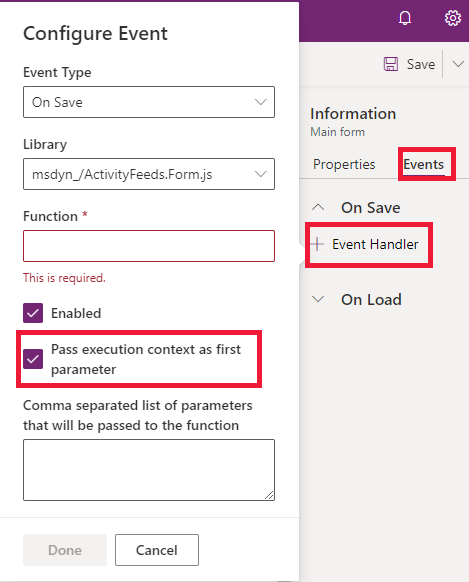
使用 UI 定义事件处理程序:执行上下文是一个 可选 参数,可以通过事件处理程序传递给 JavaScript 库函数。 使用将执行上下文作为第一个参数选项,在处理程序属性对话框中指定函数的名称以传递事件执行上下文。 执行上下文是传递给函数的第一个参数。

- 使用代码定义事件处理程序:系统会自动将执行上下文作为第一个参数传递给使用代码设置的函数。 有关可用于在代码中定义事件处理程序的方法的列表,请参阅 使用代码向事件添加或删除函数。
执行上下文对象提供处理上下文的方法。 有关详细信息,请参阅 客户端 API 执行上下文方法参考。
异步使用上下文对象
系统传递给事件的上下文仅保证在事件期间按预期方式执行。 当您在事件结束之后仍保留对上下文的引用时,可能会发生导致上下文方法行为异常的情况。
例如,如果您在持有执行上下文引用期间,事件处理程序分发了一个耗时较长的异步操作,那么等到 Promise 解析并调用上下文方法时,最终用户可能已经离开了当前页面。 这种情况可能会导致诸如formContext.getAttribute(<name>).getValue()之类的方法在返回null时,即便在原始事件处理程序执行时属性已有值。
以下示例显示应添加更多检查的位置并小心谨慎,因为事件处理程序函数在事件完成后使用执行上下文。
在Promise中访问上下文
承诺解决后,上下文可能会以意外的方式更改。
function onLoad(executionContext) {
    var formContext = executionContext.getFormContext();
    fetch("https://www.contoso.com/").then(
        function (result) {
            // Using formContext or executionContext here may not work as expected
            // because onLoad has already completed when the promise is resolved.
            formContext.getAttribute("name").setValue(result);
        }
    );
}
在 await 语句之后访问上下文
在异步函数中使用 await 后,上下文可能会以意外的方式更改。
async function onLoad(executionContext) {
    var formContext = executionContext.getFormContext();
    var result = await fetch("https://www.contoso.com/");
    // Using formContext or executionContext here might not work as expected
    // because the synchronous part of onLoad has already completed.
    formContext.getAttribute("name").setValue(result);
}
访问超时函数中的上下文
使用 setTimeout 或 setInterval 延迟执行某些代码后,上下文可能会发生意外更改。
function onLoad(executionContext) {
    var formContext = executionContext.getFormContext();
    if (notReady) {
        setTimeout(function () {
            // Using formContext or executionContext here may not work as expected
            // because onLoad has already completed when this delayed function executes.
            var name = formContext.getAttribute("name").getValue();
        }, 100);
    } else {
        formContext.getAttribute("name").setValue("abc");
    }
}