作者:Mike Wasson
本教程指导你完成在 ASP.NET 4.x 中将 Web API 添加到传统 ASP.NET Web 窗体应用程序的步骤。
概述
尽管 ASP.NET Web API 打包了 ASP.NET MVC,但可以轻松地将 Web API 添加到传统的 ASP.NET Web 窗体应用程序。
若要在 Web 窗体应用程序中使用 Web API,有两个主要步骤:
- 添加派生自 ApiController 类的 Web API 控制器。
- 将路由表添加到 Application_Start 方法。
创建 Web 窗体项目
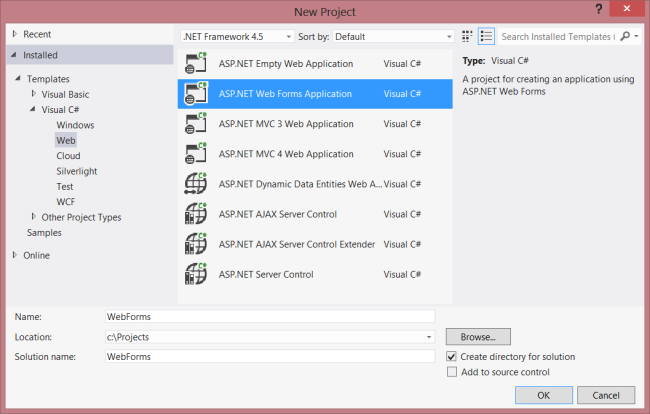
启动 Visual Studio,然后从“开始”页中选择“新建项目”。 或者,在 “文件” 菜单中,选择“ 新建 ”,然后选择“ 项目”。
在“ 模板 ”窗格中,选择“ 已安装的模板 ”并展开 “Visual C# ”节点。 在 Visual C# 下,选择 “Web”。 在项目模板列表中,选择 ASP.NET Web 窗体应用程序。 输入项目的名称,然后单击“ 确定”。
创建模型和控制器
本教程使用与 入门 教程相同的模型和控制器类。
首先,添加模型类。 在 解决方案资源管理器中,右键单击项目并选择 “添加类”。 将类命名为 Product,并添加以下实现:
public class Product
{
    public int Id { get; set; }
    public string Name { get; set; }
    public decimal Price { get; set; }
    public string Category { get; set; }
}
接下来,将 Web API 控制器添加到项目中 。控制器是 处理 Web API 的 HTTP 请求的对象。
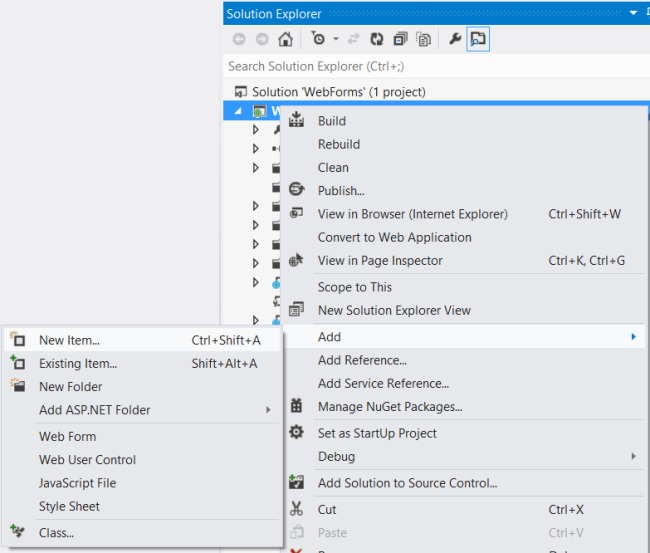
在 解决方案资源管理器中,右键单击项目。 选择“ 添加新项”。
在 “已安装的模板”下,展开 Visual C# 并选择 “Web”。 然后,从模板列表中选择 Web API 控制器类。 将控制器命名为“ProductsController”,然后单击“ 添加”。
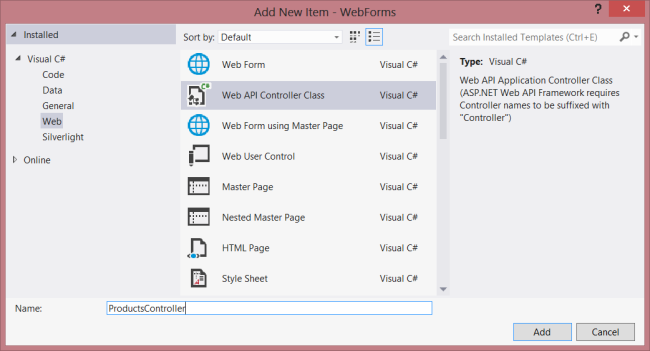
“ 添加新项 ”向导将创建一个名为ProductsController.cs的文件。 删除向导包含的方法并添加以下方法:
namespace WebForms
{
    using System;
    using System.Collections.Generic;
    using System.Linq;
    using System.Net;
    using System.Net.Http;
    using System.Web.Http;

    public class ProductsController : ApiController
    {

        Product[] products = new Product[]
        {
            new Product { Id = 1, Name = "Tomato Soup", Category = "Groceries", Price = 1 },
            new Product { Id = 2, Name = "Yo-yo", Category = "Toys", Price = 3.75M },
            new Product { Id = 3, Name = "Hammer", Category = "Hardware", Price = 16.99M }
        };

        public IEnumerable<Product> GetAllProducts()
        {
            return products;
        }

        public Product GetProductById(int id)
        {
            var product = products.FirstOrDefault((p) => p.Id == id);
            if (product == null)
            {
                throw new HttpResponseException(HttpStatusCode.NotFound);
            }
            return product;
        }

        public IEnumerable<Product> GetProductsByCategory(string category)
        {
            return products.Where(
                (p) => string.Equals(p.Category, category,
                    StringComparison.OrdinalIgnoreCase));
        }
    }
}
有关此控制器中的代码的详细信息,请参阅 入门 教程。
添加路由信息
接下来,我们将添加 URI 路由,以便将格式为“/api/products/”的 URI 路由到控制器。
在 解决方案资源管理器中,双击 Global.asax 打开代码隐藏文件Global.asax.cs。 添加以下 using 语句。
using System.Web.Http;
然后将以下代码添加到 Application_Start 方法:
RouteTable.Routes.MapHttpRoute(
    name: "DefaultApi",
    routeTemplate: "api/{controller}/{id}",
    defaults: new { id = System.Web.Http.RouteParameter.Optional }
);
有关路由表的详细信息,请参阅 ASP.NET Web API 中的路由。
添加 Client-Side AJAX
只需创建客户端可以访问的 Web API 即可。 现在,让我们添加一个使用 jQuery 调用 API 的 HTML 页面。
请确保您的母版页(例如 Site.Master)中包含 ContentPlaceHolder 和 ID="HeadContent"。
<asp:ContentPlaceHolder runat="server" ID="HeadContent"></asp:ContentPlaceHolder>
打开文件Default.aspx。 替换主内容部分中的样本文本,如下所示:
<%@ Page Title="Home Page" Language="C#" MasterPageFile="~/Site.Master"
    AutoEventWireup="true" CodeBehind="Default.aspx.cs" Inherits="WebForms._Default" %>

<asp:Content ID="HeaderContent" runat="server" ContentPlaceHolderID="HeadContent">
</asp:Content>

<asp:Content ID="BodyContent" runat="server" ContentPlaceHolderID="MainContent">
    <h2>Products</h2>
    <table>
    <thead>
        <tr><th>Name</th><th>Price</th></tr>
    </thead>
    <tbody id="products">
    </tbody>
    </table>
</asp:Content>
接下来,在 HeaderContent 节中添加对 jQuery 源文件的引用:
<asp:Content ID="HeaderContent" runat="server" ContentPlaceHolderID="HeadContent">
    <script src="Scripts/jquery-1.10.2.min.js" type="text/javascript"></script>
</asp:Content>
注意:通过将文件从 解决方案资源管理器 拖放到代码编辑器窗口中,可以轻松添加脚本引用。
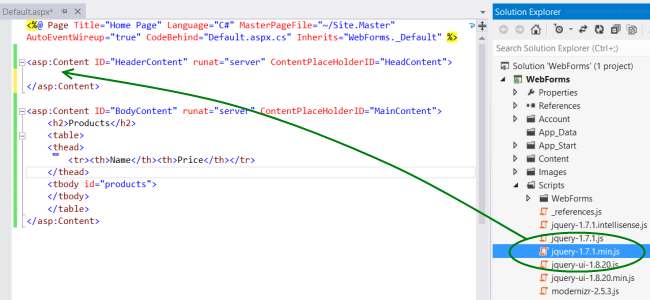
在 jQuery 脚本标记下方,添加以下脚本块:
<script type="text/javascript">
    function getProducts() {
        $.getJSON("api/products",
            function (data) {
                $('#products').empty(); // Clear the table body.

                // Loop through the list of products.
                $.each(data, function (key, val) {
                    // Add a table row for the product.
                    var row = '<td>' + val.Name + '</td><td>' + val.Price + '</td>';
                    $('<tr/>', { html: row })  // Append the name.
                        .appendTo($('#products'));
                });
            });
        }

        $(document).ready(getProducts);
</script>
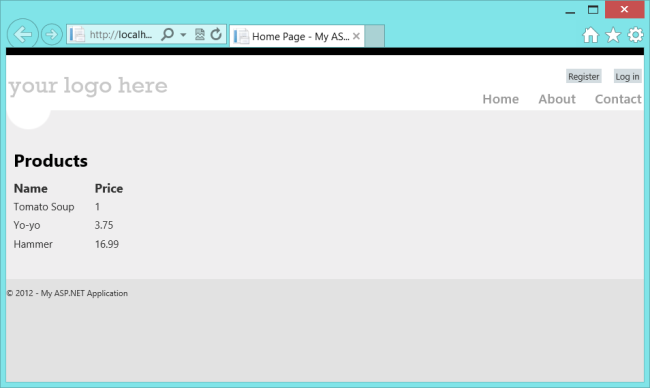
文档加载时,此脚本会向“api/products”发出 AJAX 请求。 请求返回 JSON 格式的产品列表。 该脚本将产品信息添加到 HTML 表。
运行应用程序时,它应如下所示: