本部分介绍 EF 如何加载相关实体以及如何在模型类中处理循环导航属性的一些详细信息。 (本部分提供背景知识,无需完成本教程。如果愿意,请跳到第 5 部分。
预先加载与延迟加载
将 EF 与关系数据库配合使用时,请务必了解 EF 如何加载相关数据。
查看 EF 生成的 SQL 查询也很有用。 若要跟踪 SQL,请将以下代码行添加到 BookServiceContext 构造函数:
public BookServiceContext() : base("name=BookServiceContext")
{
    // New code:
    this.Database.Log = s => System.Diagnostics.Debug.WriteLine(s);
}
如果将 GET 请求发送到 /api/books,它将返回如下所示的 JSON:
[
  {
    "BookId": 1,
    "Title": "Pride and Prejudice",
    "Year": 1813,
    "Price": 9.99,
    "Genre": "Comedy of manners",
    "AuthorId": 1,
    "Author": null
  },
  ...
可以看到 Author 属性为 null,即使书籍包含有效的 AuthorId。 这是因为 EF 未加载相关的 Author 实体。 SQL 查询的跟踪日志确认:
SELECT
    [Extent1].[BookId] AS [BookId],
    [Extent1].[Title] AS [Title],
    [Extent1].[Year] AS [Year],
    [Extent1].[Price] AS [Price],
    [Extent1].[Genre] AS [Genre],
    [Extent1].[AuthorId] AS [AuthorId]
    FROM [dbo].[Books] AS [Extent1]
SELECT 语句从 Books 表获取,并且不引用 Author 表。
为了参考,下面是返回书籍列表的类中的 BooksController 方法。
public IQueryable<Book> GetBooks()
{
    return db.Books;
}
让我们看看如何将 Author 作为 JSON 数据的一部分返回。 可通过三种方法在实体框架中加载相关数据:预先加载、延迟加载和显式加载。 每种技术都有利弊,因此了解它们的工作方式非常重要。
预先加载
通过 预先加载,EF 会将相关实体作为初始数据库查询的一部分加载。 若要执行预先加载,请使用 System.Data.Entity.Include 扩展方法。
public IQueryable<Book> GetBooks()
{
    return db.Books
        // new code:
        .Include(b => b.Author);
}
这会告知 EF 在查询中包含 Author 数据。 如果进行此更改并运行应用,现在 JSON 数据如下所示:
[
  {
    "BookId": 1,
    "Title": "Pride and Prejudice",
    "Year": 1813,
    "Price": 9.99,
    "Genre": "Comedy of manners",
    "AuthorId": 1,
    "Author": {
      "AuthorId": 1,
      "Name": "Jane Austen"
    }
  },
  ...
跟踪日志显示 EF 对 Book 和 Author 表执行了联接。
SELECT
    [Extent1].[BookId] AS [BookId],
    [Extent1].[Title] AS [Title],
    [Extent1].[Year] AS [Year],
    [Extent1].[Price] AS [Price],
    [Extent1].[Genre] AS [Genre],
    [Extent1].[AuthorId] AS [AuthorId],
    [Extent2].[AuthorId] AS [AuthorId1],
    [Extent2].[Name] AS [Name]
    FROM  [dbo].[Books] AS [Extent1]
    INNER JOIN [dbo].[Authors] AS [Extent2] ON [Extent1].[AuthorId] = [Extent2].[AuthorId]
延迟加载
使用延迟加载时,EF 会在解除对该实体的导航属性的引用时自动加载相关实体。 若要启用延迟加载,请使导航属性变得虚拟。 例如,在 Book 类中:
public class Book
{
    // (Other properties)

    // Virtual navigation property
    public virtual Author Author { get; set; }
}
现在,请考虑以下代码:
var books = db.Books.ToList();  // Does not load authors
var author = books[0].Author;   // Loads the author for books[0]
启用延迟加载后,访问 Author on books[0] 属性会导致 EF 查询作者的数据库。
延迟加载需要多次数据库请求,因为 EF 每次检索相关实体时都会发送查询。 通常,你希望对序列化的对象禁用延迟加载。 序列化程序必须读取模型上的所有属性,这会触发加载相关实体。 例如,当 EF 启用了延迟加载时序列化书籍列表,以下是 SQL 查询。 可以看到 EF 对三个作者进行了三个单独的查询。
SELECT
    [Extent1].[BookId] AS [BookId],
    [Extent1].[Title] AS [Title],
    [Extent1].[Year] AS [Year],
    [Extent1].[Price] AS [Price],
    [Extent1].[Genre] AS [Genre],
    [Extent1].[AuthorId] AS [AuthorId]
    FROM [dbo].[Books] AS [Extent1]

SELECT
    [Extent1].[AuthorId] AS [AuthorId],
    [Extent1].[Name] AS [Name]
    FROM [dbo].[Authors] AS [Extent1]
    WHERE [Extent1].[AuthorId] = @EntityKeyValue1

SELECT
    [Extent1].[AuthorId] AS [AuthorId],
    [Extent1].[Name] AS [Name]
    FROM [dbo].[Authors] AS [Extent1]
    WHERE [Extent1].[AuthorId] = @EntityKeyValue1

SELECT
    [Extent1].[AuthorId] AS [AuthorId],
    [Extent1].[Name] AS [Name]
    FROM [dbo].[Authors] AS [Extent1]
    WHERE [Extent1].[AuthorId] = @EntityKeyValue1
有时你可能想要使用延迟加载。 急切加载可能会导致 EF 生成非常复杂的联接。 或者您可能只需要数据中的一小部分相关实体,此时使用延迟加载会更加高效。
避免序列化问题的一种方法是序列化数据传输对象(DTO),而不是实体对象。 本文稍后将介绍此方法。
显式加载
显式加载类似于延迟加载,只是需要通过代码显式获取相关数据,当访问导航属性时,它不会自动发生。 显式加载可让你更好地控制何时加载相关数据,但需要额外的代码。 有关显式加载的详细信息,请参阅 “加载相关实体”。
导航属性和循环引用
定义 Book 和 Author 模型时,我在类上 Book 为 Book-Author 关系定义了导航属性,但我没有在其他方向定义导航属性。
如果将相应的导航属性添加到 Author 类,会发生什么情况?
public class Author
{
    public int AuthorId { get; set; }
    [Required]
    public string Name { get; set; }

    public ICollection<Book> Books { get; set; }
}
遗憾的是,在序列化模型时,这会产生问题。 如果加载相关数据,它将创建一个圆形对象图。
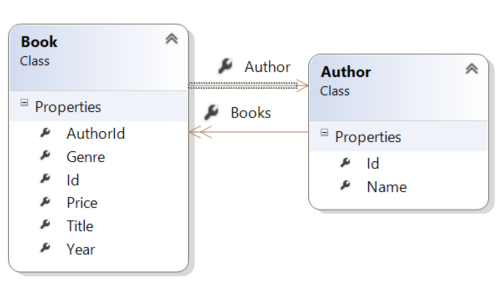
当 JSON 或 XML 格式化程序尝试序列化图形时,它将引发异常。 这两个格式化程序会引发不同的异常消息。 下面是 JSON 格式化程序的示例:
{
  "Message": "An error has occurred.",
  "ExceptionMessage": "The 'ObjectContent`1' type failed to serialize the response body for content type
      'application/json; charset=utf-8'.",
  "ExceptionType": "System.InvalidOperationException",
  "StackTrace": null,
  "InnerException": {
    "Message": "An error has occurred.",
    "ExceptionMessage": "Self referencing loop detected with type 'BookService.Models.Book'.
        Path '[0].Author.Books'.",
    "ExceptionType": "Newtonsoft.Json.JsonSerializationException",
    "StackTrace": "..."
     }
}
下面是 XML 格式化程序:
<Error>
  <Message>An error has occurred.</Message>
  <ExceptionMessage>The 'ObjectContent`1' type failed to serialize the response body for content type
    'application/xml; charset=utf-8'.</ExceptionMessage>
  <ExceptionType>System.InvalidOperationException</ExceptionType>
  <StackTrace />
  <InnerException>
    <Message>An error has occurred.</Message>
    <ExceptionMessage>Object graph for type 'BookService.Models.Author' contains cycles and cannot be
      serialized if reference tracking is disabled.</ExceptionMessage>
    <ExceptionType>System.Runtime.Serialization.SerializationException</ExceptionType>
    <StackTrace> ... </StackTrace>
  </InnerException>
</Error>
一种解决方案是使用 DTO,下一部分将介绍。 或者,可以将 JSON 和 XML 格式化程序配置为处理图形周期。 有关详细信息,请参阅 处理循环对象引用。
在本教程中,不需要 Author.Book 导航属性,因此可以将其排除在外。