Note
Access to this page requires authorization. You can try signing in or changing directories.
Access to this page requires authorization. You can try changing directories.
Summary
You might receive errors when you try to delete or modify a virtual network or subnet in Microsoft Azure. Resources like gateways, private endpoints, service endpoints, subnet delegations, and orphaned network interfaces can block deletion or modification. This article provides troubleshooting steps to help you resolve these problems.
Troubleshoot virtual network and subnet issues
Virtual network deletion
- Check whether a virtual network gateway is running in the virtual network.
- Check whether an application gateway is running in the virtual network.
- Check whether Azure container instances still exist in the virtual network.
- Check whether Microsoft Entra Domain Services is enabled in the virtual network.
- Check whether the virtual network is connected to other resources.
- Check whether a virtual machine is still running in the virtual network.
- Check whether the virtual network is stuck in migration.
- Check whether the virtual network was used by a web app for virtual network integration.
Subnet deletion
- Check whether private endpoints exist in the subnet.
- Check whether service endpoints are configured on the subnet.
- Check whether the subnet has a delegation.
- Check whether service association links exist on the subnet.
- Check whether orphaned network interfaces remain in the subnet.
- Check whether the subnet is used by Azure Bastion or Azure Firewall.
Subnet modification
- Resize a subnet that contains active resources.
- Change or remove a subnet delegation.
- Add or remove service endpoints on an active subnet.
Troubleshooting steps
Check whether a virtual network gateway is running in the virtual network
To remove the virtual network, first remove the virtual network gateway.
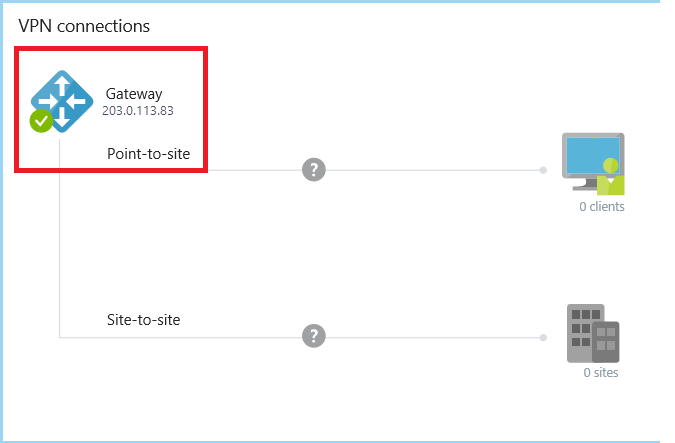
For classic virtual networks, go to the Overview page of the classic virtual network in the Azure portal. In the VPN connections section, if the gateway runs in the virtual network, the IP address of the gateway appears.
For virtual networks, go to the Overview page of the virtual network. Check Connected devices for the virtual network gateway.
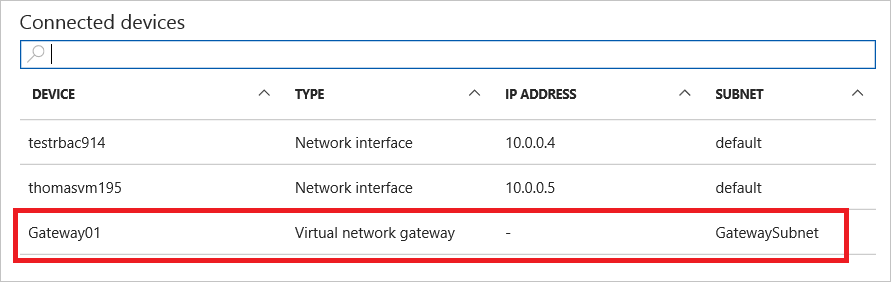
Before you can remove the gateway, remove any Connection objects in the gateway.
Check whether an application gateway is running in the virtual network
Go to the Overview page of the virtual network. Check the Connected devices for the application gateway.
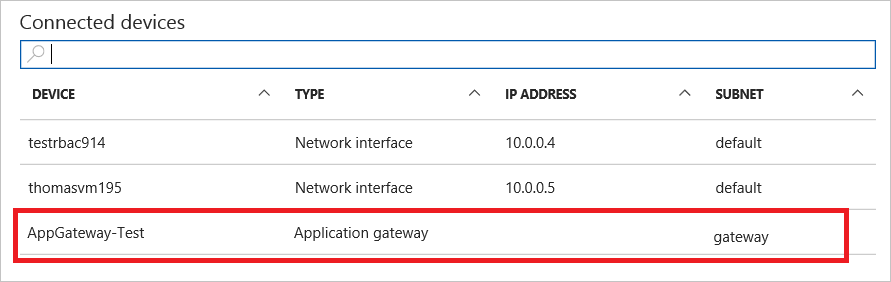
If there's an application gateway, you must remove it before you can delete the virtual network.
Check whether Azure Container Instances still exist in the virtual network
Note
As of the Azure Container Instances API version 2021-07-01, Azure Container Instances no longer use network profiles. If you use this or a more recent API version, the portal doesn't create network profiles. The following guidance applies only to legacy deployments that use an older API version.
In the Azure portal, go to the resource group's Overview page.
In the header for the list of the resource group's resources, select Show hidden types. The portal hides the network profile type by default.
Select the network profile related to the container groups.
Select Delete.

Delete the subnet or virtual network again.

If these steps don't resolve the issue, use these Azure CLI commands to clean up resources.
Check whether Microsoft Entra Domain Services is enabled in the virtual network
If Microsoft Entra Domain Services is enabled and connected to the virtual network, you can't delete this virtual network.
To delete the managed domain, see Delete a Microsoft Entra Domain Services managed domain.
Check whether the virtual network is connected to other resources
Check for circuit links, connections, and virtual network peerings. Any of these resources can cause a virtual network deletion to fail.
Use the following recommended deletion order:
- Gateway connections
- Gateways
- IPs
- Virtual network peerings
- App Service Environment (ASE)
Check whether a virtual machine is still running in the virtual network
Make sure that no virtual machine is in the virtual network.
Check whether the virtual network is stuck in migration
If the virtual network is stuck in a migration state, you can't delete it. Run the following command in Azure PowerShell to abort the migration and then delete the virtual network.
Move-AzureVirtualNetwork -VirtualNetworkName "Name" -Abort
Check whether the virtual network was used by a web app for virtual network integration
If you integrated the virtual network with a web app in the past, but you deleted the web app without disconnecting the virtual network integration, see Deleting the App Service plan or web app before disconnecting the virtual network integration.
Troubleshoot subnet deletion failures
Check whether private endpoints exist in the subnet
If a subnet has private endpoints, you can't delete the subnet. You need to remove all private endpoints before you delete the subnet.
- In the Azure portal, go to the virtual network and select Subnets.
- Select the subnet you want to delete and check the Private endpoints column.
- If private endpoints exist, go to each private endpoint resource and delete it.
Alternatively, use Azure CLI to identify private endpoints in a subnet:
az network vnet subnet show \
    --resource-group <resource-group> \
    --vnet-name <vnet-name> \
    --name <subnet-name> \
    --query "privateEndpoints[].id" \
    --output tsv
Remove each private endpoint:
az network private-endpoint delete \
    --resource-group <resource-group> \
    --name <private-endpoint-name>
Check whether service endpoints are configured on the subnet
Service endpoints are subnet-level configurations and don't block subnet deletion. As stated in the Azure Virtual Network FAQ, you can delete a subnet even when service endpoints are turned on.
However, if you need to remove service endpoints as part of a broader cleanup or modification, use the following steps:
- In the Azure portal, go to the virtual network and select Subnets.
- Select the subnet and check the Service endpoints section.
- Remove any configured service endpoints and select Save.
Use Azure CLI to check and remove service endpoints:
az network vnet subnet show \
    --resource-group <resource-group> \
    --vnet-name <vnet-name> \
    --name <subnet-name> \
    --query "serviceEndpoints[].service" \
    --output tsv
Remove service endpoints by updating the subnet:
az network vnet subnet update \
    --resource-group <resource-group> \
    --vnet-name <vnet-name> \
    --name <subnet-name> \
    --service-endpoints '[]'
Check whether the subnet has a delegation
A subnet delegation assigns the subnet to a specific Azure service, like Microsoft.DBforPostgreSQL/flexibleServers, Microsoft.Web/serverFarms, or Microsoft.ContainerService/managedClusters. You can't delete a delegated subnet until you remove all resources that use the delegation and then remove the delegation itself.
Common subnet delegations include:
| Delegation | Service |
|---|---|
Microsoft.ContainerInstance/containerGroups |
Azure Container Instances |
Microsoft.DBforPostgreSQL/flexibleServers |
Azure Database for PostgreSQL - Flexible Server |
Microsoft.DBforMySQL/flexibleServers |
Azure Database for MySQL - Flexible Server |
Microsoft.Web/serverFarms |
Azure App Service / Azure Functions |
Microsoft.ContainerService/managedClusters |
Azure Kubernetes Service (AKS) |
Microsoft.Sql/managedInstances |
Azure SQL Managed Instance |
Microsoft.Network/dnsResolvers |
Azure DNS Private Resolver |
Microsoft.Netapp/volumes |
Azure NetApp Files |
Microsoft.ApiManagement/service |
Azure API Management |
Use Azure CLI to check delegation:
az network vnet subnet show \
    --resource-group <resource-group> \
    --vnet-name <vnet-name> \
    --name <subnet-name> \
    --query "delegations[].{name:name, service:serviceName}" \
    --output table
To remove a delegation, first delete all resources that use the delegated subnet. Then remove the delegation by using the following command:
az network vnet subnet update \
    --resource-group <resource-group> \
    --vnet-name <vnet-name> \
    --name <subnet-name> \
    --remove delegations
Check whether service association links exist on the subnet
Azure services like Azure Container Instances, Azure App Service, and Azure SQL Managed Instance create service association links when they deploy resources into a subnet. These links prevent deletion of the subnet even after you remove the deployed resources.
Use Azure CLI to check for service association links:
az network vnet subnet show \
    --resource-group <resource-group> \
    --vnet-name <vnet-name> \
    --name <subnet-name> \
    --query "serviceAssociationLinks[].{link:link, linkedResourceType:linkedResourceType}" \
    --output table
If service association links remain after you delete the resources, they might take several minutes to clear. If they persist, try the following steps:
- Verify no resources from the linked service are still deployed in the subnet.
- Wait 10-15 minutes for the platform to clean up the links.
- If the links still persist, open an Azure support request referencing the specific
linkedResourceType.
For Azure Container Instances specifically, see Clean up resources for CLI commands to remove container groups and network profiles.
Check whether orphaned network interfaces remain in the subnet
Network interfaces (NICs) left behind after you delete a virtual machine or other resource can block subnet deletion. You must remove each NIC with an IP configuration in the subnet.
Use Azure CLI to list NICs in a subnet:
az network vnet subnet show \
    --resource-group <resource-group> \
    --vnet-name <vnet-name> \
    --name <subnet-name> \
    --query "ipConfigurations[].id" \
    --output tsv
The output shows the resource IDs of the IP configurations associated with the subnet. Extract the NIC name from the resource ID and delete the orphaned NIC:
az network nic delete \
    --resource-group <resource-group> \
    --name <nic-name>
If the NIC is still attached to a virtual machine, detach or delete the virtual machine first.
Check whether the subnet is used by Azure Bastion or Azure Firewall
The AzureBastionSubnet and AzureFirewallSubnet subnets are reserved by their respective services. You can't delete these subnets while the associated Azure Bastion or Azure Firewall resource exists.
For Azure Bastion:
- In the Azure portal, search for Bastions and find the Bastion resource in the same virtual network.
- Delete the Azure Bastion resource.
- After the deletion finishes, delete the
AzureBastionSubnet.
For Azure Firewall:
- In the Azure portal, search for Firewalls and find the Firewall resource.
- Deallocate or delete the Azure Firewall resource.
- After the deallocation or deletion finishes, delete the
AzureFirewallSubnet. - Use Azure CLI to check connected resources:
az network vnet subnet show \
    --resource-group <resource-group> \
    --vnet-name <vnet-name> \
    --name AzureBastionSubnet \
    --query "ipConfigurations[].id" \
    --output tsv
Troubleshoot subnet modification failures
Resize a subnet that contains active resources
You can resize a subnet that has active resources if the new address range still includes all existing IP addresses. If the new range excludes an IP address in use, the resize operation fails.
Before you resize:
Use Azure CLI to check the number of used IP addresses in the subnet.
az network vnet subnet show \
    --resource-group <resource-group> \
    --vnet-name <vnet-name> \
    --name <subnet-name> \
    --query "ipConfigurations | length(@)"
Verify the new address prefix accommodates all assigned addresses.
Update the subnet.
az network vnet subnet update \
    --resource-group <resource-group> \
    --vnet-name <vnet-name> \
    --name <subnet-name> \
    --address-prefixes <new-prefix>
Note
Azure reserves five IP addresses within each subnet: the first four addresses and the last address. When resizing, account for these reserved addresses and your current allocations.
Change or remove a subnet delegation
You can't change a subnet delegation while resources from the current delegation are deployed. To change the delegation:
Remove all resources that use the current delegation (for example, delete the flexible server or app service plan).
Use Azure CLI to remove the existing delegation.
az network vnet subnet update \
    --resource-group <resource-group> \
    --vnet-name <vnet-name> \
    --name <subnet-name> \
    --remove delegations
Add the new delegation.
az network vnet subnet update \
    --resource-group <resource-group> \
    --vnet-name <vnet-name> \
    --name <subnet-name> \
    --delegations <new-service-delegation>
Add or remove service endpoints on an active subnet
Changing service endpoints on an active subnet can cause a brief connectivity disruption to the target service. Plan endpoint changes during a maintenance window.
Use Azure CLI to add a service endpoint.
az network vnet subnet update \
    --resource-group <resource-group> \
    --vnet-name <vnet-name> \
    --name <subnet-name> \
    --service-endpoints Microsoft.Storage Microsoft.Sql
To remove a specific service endpoint, specify only the endpoints you want to keep.
az network vnet subnet update \
    --resource-group <resource-group> \
    --vnet-name <vnet-name> \
    --name <subnet-name> \
    --service-endpoints Microsoft.Storage
Warning
Removing a service endpoint while resources depend on it can cause connectivity loss. Verify no active resources rely on the endpoint before you remove it.
Common error messages
| Error message | Cause | Resolution |
|---|---|---|
Subnet <name> is in use and cannot be deleted. |
Resources such as NICs, private endpoints, or service deployments are still in the subnet. | Use the diagnostic commands to identify blocking resources and remove them. |
InUseSubnetCannotBeDeleted |
The subnet contains IP configurations from VMs, load balancers, or other resources. | Remove or move the resources to another subnet and then retry the deletion. |
SubnetHasServiceEndpoints |
Service endpoints are configured on the subnet. | Service endpoints alone don't block subnet deletion. If this error occurs with other blocking resources, resolve those resources first. To remove service endpoints, see Check whether service endpoints are configured on the subnet. |
SubnetHasDelegations |
The subnet is delegated to a service and resources from that service are deployed. | Remove the service resources that use the delegation and then remove the delegation. |
SubnetWithExternalResourcesCannotBeUsedByOtherResources |
Another Azure service has deployed resources in the subnet. | Identify the service by using service association links and remove the deployed resources. |
InUseNetworkInterfaceCannotBeAssociatedWithSubnet |
An orphaned NIC has an IP configuration that conflicts with subnet operations. | Delete the orphaned NIC and then retry the operation. |
SubnetIsDelegatedAndCannotBeUsed |
The subnet is already delegated to another service. | Change or remove the delegation before running a new service. |
Cannot delete virtual network <name> because it is in use by resource <id>. |
A resource is still attached to the VNet. | Follow the virtual network deletion guidance to identify and remove the resource. |
NetworkProfileCannotBeDeleted |
A network profile used by Azure Container Instances still references the subnet. | See Check whether Azure container instances still exist in the virtual network to resolve the problem. |
Diagnostic commands
Use the following Azure CLI command to get a comprehensive view of all resources and configurations that might block subnet deletion or modification:
az network vnet subnet show \
    --resource-group <resource-group> \
    --vnet-name <vnet-name> \
    --name <subnet-name> \
    --query "{addressPrefix:addressPrefix, delegations:delegations[].serviceName, serviceEndpoints:serviceEndpoints[].service, ipConfigurations:ipConfigurations[].id, privateEndpoints:privateEndpoints[].id, serviceAssociationLinks:serviceAssociationLinks[].linkedResourceType}" \
    --output json
This command returns:
- addressPrefix: The current address range of the subnet.
- delegations: Services the subnet is delegated to.
- serviceEndpoints: Configured service endpoints.
- ipConfigurations: NICs and other resources with IP addresses in the subnet.
- privateEndpoints: Private endpoints associated with the subnet.
- serviceAssociationLinks: Services that deployed resources into the subnet.
If any of these fields contain values, you must remove those resources before you can delete or modify the subnet.