Note
Access to this page requires authorization. You can try signing in or changing directories.
Access to this page requires authorization. You can try changing directories.
This guide outlines how software development companies can build AI apps and agents and publish them to Microsoft Marketplace.
Introductory concepts
What is an AI app or agent?
An AI app or agent assists individuals or organizations by using artificial intelligence (AI) to automate business processes. These agents perceive their environment, reason based on that perception, and take appropriate action. Their complexity ranges from basic retrieval functions to advanced autonomous operations. Microsoft Marketplace helps customers easily discover, try, and buy your AI apps and agents.
Why should software companies publish AI apps and agents to Microsoft Marketplace?
Publishing AI apps and agents to Microsoft Marketplace enables software companies to:
- Reach more customers: Reach 6M+ monthly customers across 141+ global markets
- Acquire customers where they work: Distribute your solutions through Microsoft products to meet users in their daily flow
- Scale with channel-led sales: Extend your reach through an ecosystem of 500K+ partners through various sales models
Learn more about the benefits of distributing and monetizing your AI apps and agents through Marketplace.
Choose the right offer type for your agent
You can explore Partner Center offers with multiple options for Publishing. Depending on their primary capabilities and intended audience, agentic solutions are categorized as either Azure agents or Microsoft 365 agents.
For a detailed comparison of all options, refer to Publish and release your AI app and agent.
Your path to AI apps and agents success
Generative AI apps and agents are becoming indispensable within the evolving technological landscape. Microsoft Marketplace offers a robust suite of resources to ensure success, including access to qualified customers, proven publishing frameworks, and a comprehensive support infrastructure.
To get started on the publishing journey for your AI apps and agents, learn more in the next section of this article.
AI apps and agents quality definitions
This section outlines what "quality" means for your AI application or agent. New AI solutions must set clear expectations, meet high-quality bars, and comply with security and regulatory standards. Each subsection below is expanded into concrete criteria for your solution.
Quality expectations
Clarity of purpose
Provide a clear articulation of what the AI agent does, who the intended users are, and the specific business outcomes it delivers. In other words, what value does your AI solution offer, and to whom?
For example, if you're building a contract analysis agent, state up front that it extracts key terms and potential risks from contracts to assist legal teams. This helps customers immediately grasp the agent's purpose and how it fits their scenarios. Make sure the expected use cases are well-defined; for example, "analyzing legal documents for compliance" so that both your team and your customers understand the agent's intended scope.
Defined boundaries
Clearly define the boundaries and limitations of your AI agent - explicitly - what the agent will not do. This manages user expectations and prevents misuse. For instance, you might clarify that "the agent doesn't provide legal advice or make final decisions - it only summarizes and highlights content for human review."
By outlining non-goals and constraints, you avoid user confusion and reduce the risk of the AI being pushed beyond its safe or intended function. These boundaries should be documented in your user guide or transparency notes.
Transparent data handling
Set and communicate privacy and data handling expectations with customers. Be transparent about what data the AI agent collects or processes, how it's used, and how long it's retained.
For example, if your solution processes user-provided documents, explain that "documents are processed in memory without being stored" (if true), or "customer data is encrypted and only retained for 30 days to allow model improvement." Include this information in your privacy policy or documentation, so customers know how their data is protected.
Transparent data practices build trust and are often required for compliance.
Baseline performance
Establish baseline performance expectations for your AI agent in terms of responsiveness, accuracy, and reliability. In practice, this means defining targets like:
- Expected response time: For example, "The agent responds to user queries within 2 seconds on average"
- Accuracy rates: For example, "At least 90% of responses should be factually correct, given the provided context"
- Uptime/service reliability: For example, "99.5% uptime"
Setting these benchmarks helps guide your engineering and allows you to verify the solution meets a minimum quality bar before publishing. It also gives reviewers and customers a sense of the agent's performance profile.
Accessibility
Decide and document accessibility expectations for your user interface, prompts, and overall user flows. All parts of the solution should ideally comply with accessibility standards, such as Web Content Accessibility Guidelines (WCAG). This documentation could include:
- Ensuring your web UI supports screen readers
- Providing alt-text for images in your chatbot interface
- Offering transcript or caption options for audio outputs, and using clear, simple language
This is Marketplace policy.
Quality
Robust evaluation sets
Develop extensive evaluation datasets to test your AI agents quality, safety, grounding accuracy, and behavior on edge cases. Don't rely only on happy-path tests. For instance, to see how the agent performs, create sample queries or tasks that cover typical use cases and tricky cases (slang input, extremely long queries, ambiguous requests, etc.). Include tests specifically for:
- Factual grounding: Does the agent stick to provided information or known data?
- Safety: Does it avoid disallowed content?
By evaluating these scenarios, you can quantify quality (for example, "85% success on standard queries, handle 95% of edge cases appropriately") and identify areas to improve before release.
Defined success metrics
Establish clear success metrics to measure your AI's performance. Examples might include:
- Accuracy: Percentage of correct answers the agent provides
- Grounded response rate: How often the AI's answers are supported by an authoritative source - aiming for as high a percentage as possible
- Deflection rate: For support bots, how many inquiries are resolved by the AI vs. handed off to humans
Define what success looks like numerically. For instance, "target a relevance score of 90% in retrieval tasks" or "reduce support ticket volume by 30% via the AI agent."
These metrics guide development and serve as proof points to customers that your solution is effective.
Continuous regression testing
Implement continuous regression testing for your AI models and prompts. Every time you update the model, retrain it, or tweak prompts, run an automated test suite to ensure you haven't degraded performance on key metrics or broken previously working scenarios. This could be integrated into your CI/CD pipeline (for example, nightly runs of critical "Question and Answer" pairs or scenario tests). By catching regressions early, you maintain quality over time - which is crucial as you make iterative improvements or respond to new data. It's easier to fix an issue before customers or Marketplace reviewers find it.
Output stability
Ensure output stability across versions and environments. Your AI agent should give consistent results when facing the same input, regardless of minor version changes or deployment environment. For example, if you deploy an updated model, the tone or format of answers shouldn't wildly change unless intended. Consider versioning your prompts or AI models, and maintain backward compatibility for critical functions if possible. If differences are expected (say, a new version improves accuracy but changes some phrasing), document them.
Consistent behavior builds user trust and makes your solution easier to support.
Human-in-the-loop for high-risk
For high-risk actions or decisions, incorporate a human-in-the-loop validation step. Identify if your agent ever does something with significant consequences - for example, automatically sending an email on the user's behalf, executing a financial transaction, or making a compliance decision. In such cases, design the workflow so that a human must review or approve the AI's output before it's finalized. For instance, the agent could draft an answer, but a human agent or manager approves it for certain sensitive customer queries. Requiring human validation reduces the chance of catastrophic errors and aligns with Responsible AI practices (don't let the AI operate unchecked in critical areas).
Fallbacks for failures
Create documented fallback procedures for when the AI model fails or if the service experiences degraded performance. This means if the AI can't confidently answer or something goes wrong (service timeout, etc.), it should have a safe response or action. For example, if an AI that usually automates a task is unsure, it might politely decline and escalate to a human or a predefined safe output. Also plan for system outages: if your AI component is down, can your application still function in a limited mode? Document these behaviors as part of your design (for instance, "If the AI is unavailable, the system displays a message and logs the issue, and we'll get an alert to respond within X hours").
Marketplace reviewers might ask how you handle failure cases, and having this clearly defined shows maturity in your solution's design.
Security
Tenant isolation
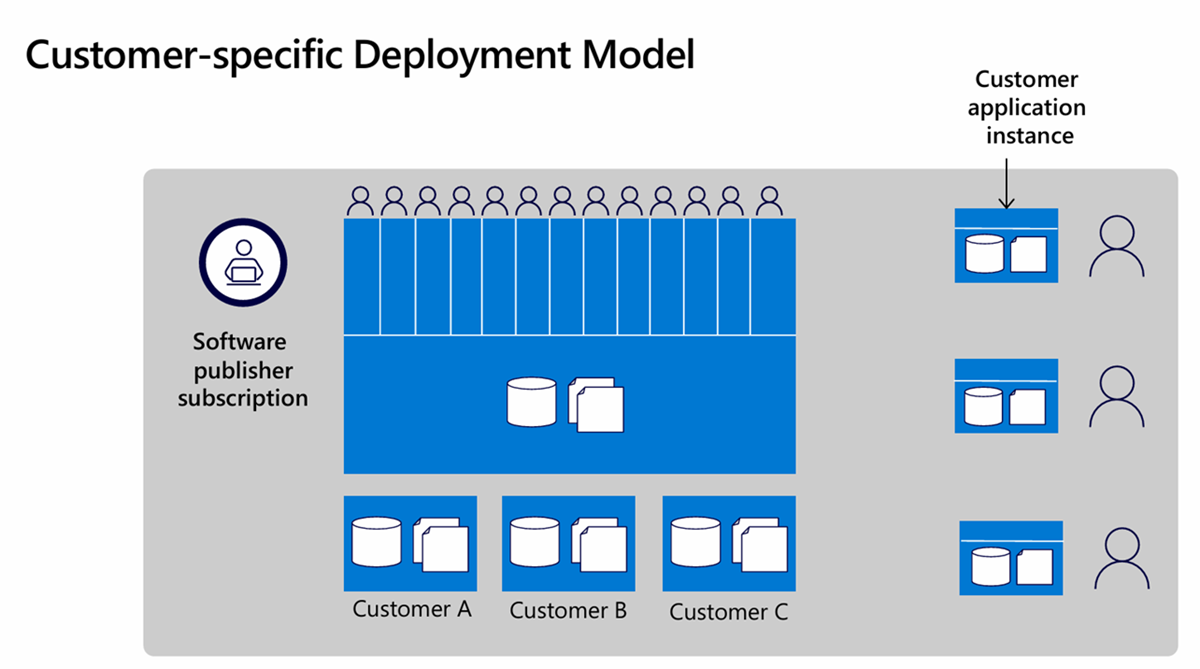
Enforce strict tenant isolation in multi-customer environments. If your AI service is multitenant (serving many customers from one system), design it so each customer's data and configurations are completely separated. This separation often means using unique identifiers per tenant to partition data and never mixing contexts between tenants. For example, Customer B should never see Customer A's queries and data. Use access controls at every layer: database queries, storage buckets, and in-memory operations should all scope to the current tenant. No hard-coded secrets or shared credentials across tenants. By ensuring robust isolation, you protect against data leakage - a critical requirement when enterprises evaluate your solution.
Identity and least privilege
Integrate with Microsoft Entra ID (formerly Azure AD) for authentication and use managed identities with least-privilege access. This means your solution should offload identity management to Azure AD/Entra ID for users logging in, which provides enterprise-grade security (MFA, single sign-on, etc.). Within your Azure services, prefer using Managed Identities to access other resources (for example, your app's code can securely call an Azure Storage or Database without embedding keys, by using its Azure AD identity). Ensure each component only has the minimum permissions it needs - for example, if your agent needs to read from a storage container, grant it read access to that container only, not full account access.
Following the principle of least privilege minimizes the impact if any component is compromised.
Secure webhooks and APIs
Protect all webhook endpoints and APIs with proper validation, authentication, and idempotency. For instance, when you set up SaaS fulfillment webhooks (which will be called by the Marketplace), use tokens or signatures to verify the calls actually come from Microsoft and haven't been tampered with. Implement idempotency (each event is processed only once even if sent multiple times) by tracking event IDs or using deduplication mechanisms. If your agent exposes any API endpoints (for example, for customers to query results or integrate with your service), secure them with API keys or OAuth and throttle as necessary. A good practice is to use Azure API Management or similar gateways to add an extra layer of security and monitoring to your endpoints.
By locking down webhooks and APIs, you prevent common attack vectors and ensure only authorized calls get through.
Data protection
Apply strong encryption and data protection measures, both at rest and in transit. Use HTTPS/TLS for all client-agent and service-service communications so that data in transit is encrypted. For data at rest (databases, logs, file storage), use encryption (Azure services often encrypt at rest by default; verify this or manage your own keys via Azure Key Vault). Implement PII/PHI filtering if your AI might handle personal or sensitive data - for example, your system could automatically mask or exclude fields like social security numbers, patient records, etc., either before processing or in the AI's output, to avoid unintentional exposure. If the AI generates any logs, design the logging to avoid writing sensitive data whenever possible (for example, log an operation happened but not the exact content).
These practices align with enterprise security standards and will be scrutinized during any security review.
Secrets management
Handle all secrets (API keys, credentials, certificates) securely, preferably via Azure Key Vault with proper rotation and audit logging. Never store secrets in code or configuration files in plain text. Instead, store them in Key Vault and have your application fetch them at runtime. Utilize Key Vault's features: set access policies so only your app's identity can retrieve the needed secrets, enable logging to see who accessed what, and set up a rotation policy (some secrets like database passwords or certificates should be rotated periodically).
Auditors and savvy customers often ask how you manage secrets - showing that you use a robust system like Key Vault demonstrates a mature security posture. It also reduces the risk of breaches (since even if someone gets your source code or config, they can't find live passwords there).
Logging policies
Establish logging policies that capture useful security and performance data without storing any sensitive customer information. For example, log events like "User X invoked action Y at time Z" or "AI prompt length = N tokens, response time = M seconds," but do not log the actual content of user queries if they might contain private data. If debugging requires some content logging, consider hashing or truncating it. Ensure any logs that do contain customer info are protected (stored securely and access-restricted). Also, plan log retention carefully - keep logs long enough for troubleshooting and auditing (say 30-90 days), but not forever. Follow data minimization principles.
By creating clear logging guidelines, you help protect privacy and comply with regulations, while still retaining the ability to diagnose issues.
Compliance
- Responsible AI documentation: Transparency notes, limitations, safety disclosures
- Compliance alignment: With SOC, ISO, data protection regulations, and other industry requirements
- Data: Retention, deletion, and user consent procedures
- Accessibility compliance: Web Content Accessibility Guidelines (WCAG), localized content and UI
- Evidence package: For Marketplace reviewers (privacy, support, security)