Note
Access to this page requires authorization. You can try signing in or changing directories.
Access to this page requires authorization. You can try changing directories.
Before you configure the Sales Opportunity Agent, ensure that your Dynamics 365 Sales environment meets the following prerequisites.
| Prerequisite | Description |
|---|---|
| Bing search | Required for the agent to find and retrieve answers from your data sources. |
| Dataverse Search | Required for the agent to retrieve relevant records from Dynamics 365 Sales. |
| Microsoft 365 Services | Required if you want the agent to read emails directly from sellers' Microsoft 365 mailboxes. |
Configure the prerequisites
On the Prerequisites section, configure the following settings:
Bing search: Select Accept terms to open the Power Platform admin center and accept the terms for Bing search. To learn more, see Turn on data movement, Bing search, and Microsoft 365 services for Copilots and generative AI features.
Dataverse Search: The agent uses Dataverse Search to retrieve relevant records from Dynamics 365 Sales. If you didn't set up Dataverse Search, select Set up to open the Dataverse Search settings page and follow the instructions to set it up. After setting up Dataverse Search, return to the agent configuration page and select Refresh to update the status of this prerequisite. Learn more about configuring Dataverse search for your environment.
Microsoft 365 Services: (Optional) To allow the agent to read emails directly from the sellers' Microsoft 365 mailboxes, select Mark as done and then select Apply changes. Sellers are also prompted to provide consent when they first access the Opportunity research page. If you want to use server-side synchronization for reading emails, don't select the checkbox.
To configure and use Microsoft 365 Services, you need:
- At least one of the following roles: Global administrator, Dynamics 365 administrator, or similar.
- At least one of the following licenses: Microsoft 365/Office 365, Power Automate Premium, or Dynamics 365 Sales Enterprise Edition.
Note
The agent reads emails of the opportunity owner to generate insights. However, the insights are visible to all users who can access the opportunity.

Configure server-side synchronization
If you want the agent to access only the emails and meetings synced to Dynamics 365 Sales, configure server-side synchronization for seller mailboxes. Alternatively, you can enable Microsoft 365 Services for the agent to read emails directly from the sellers' Microsoft 365 mailboxes.
If you enable both server-side synchronization and Microsoft 365 Services, the agent reads emails from both sources and generates insights accordingly.
Configure mailboxes of sellers who own the opportunities and approve their mailboxes. When the configuration succeeds, the Incoming Email Status and Outgoing Email Status for the mailbox are set to Success.

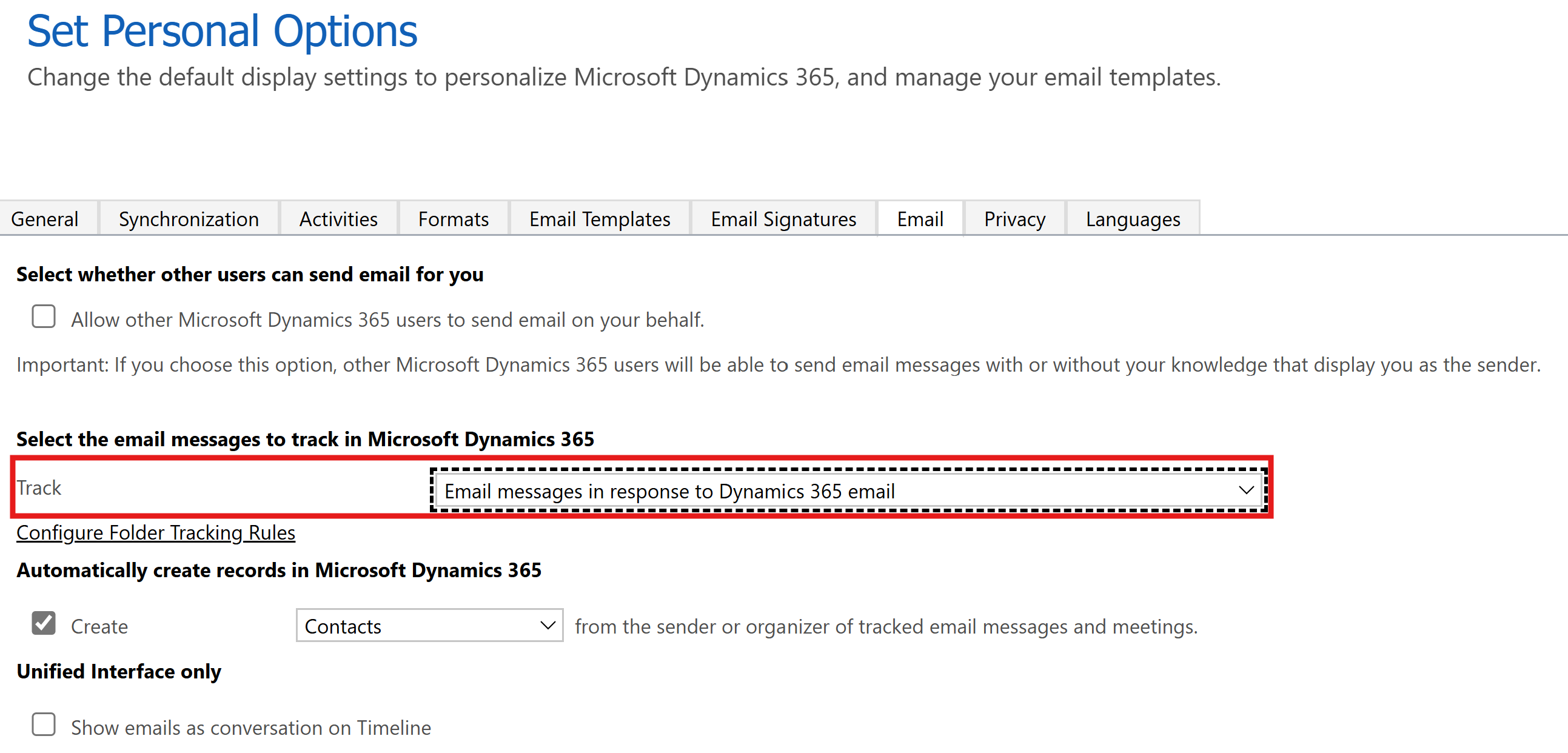
Make sure that the personalization option for email tracking is set to an appropriate value to allow the agent to access emails and meetings from the sellers' mailboxes. Choose an option that best suits your organization's privacy policies. Perform one of the following actions:
Notify the sellers to set the tracking option in the Sales Hub app from Settings > Personalization settings > Emails > Track.
Use the User Settings Utility in XRMToolBox to select multiple sellers and set the
Track email messagessetting to an appropriate tracking option.
Next step
Configure the agent profile for Sales Opportunity Agent.