Note
Access to this page requires authorization. You can try signing in or changing directories.
Access to this page requires authorization. You can try changing directories.
Applies to:  Azure SQL Database
SQL database in Fabric
Azure SQL Database
SQL database in Fabric
This article provides an overview of using artificial intelligence (AI) options, such as OpenAI and vectors, to build intelligent applications with the SQL Database Engine in Azure SQL Database and Fabric SQL database.
Watch this video in the Azure SQL Database essentials series for a brief overview of building an AI ready application:
For samples and examples, visit the SQL AI Samples repository.
Overview
Large language models (LLMs) enable developers to create AI-powered applications with a familiar user experience.
Using LLMs in applications brings greater value and an improved user experience when the models can access the right data, at the right time, from your application's database. This process is known as Retrieval Augmented Generation (RAG). Azure SQL Database and Fabric SQL database have many features that support this new pattern, making them great databases for building intelligent applications.
The following links provide sample code of various options to build intelligent applications:
| AI Option | Description |
|---|---|
| SQL MCP Server | A stable and governed interface for your database, defining a set of tools and configuration. |
| Azure OpenAI | Generate embeddings for RAG and integrate with any model supported by Azure OpenAI. |
| Vectors | Learn how to store vectors and use vector functions in the database. |
| Azure AI Search | Use your database together with Azure AI Search to train LLM on your data. |
| Intelligent applications | Learn how to create an end-to-end solution using a common pattern that can be replicated in any scenario. |
| Copilot skills in Azure SQL Database | Learn about the set of AI-assisted experiences designed to streamline the design, operation, optimization, and health of Azure SQL Database-driven applications. |
| Copilot skills in Fabric SQL database | Learn about the set of AI-assisted experiences designed to streamline the design, operation, optimization, and health of Fabric SQL database-driven applications. |
SQL MCP Server in AI applications
SQL MCP Server sits directly in the data path for AI agents.
- As models generate requests, the server provides a stable and governed interface to your database.
- Instead of exposing raw schema or relying on generated SQL, it routes all access through a defined set of tools backed by your configuration.
This approach keeps interactions predictable and ensures every operation aligns with the permissions and structure you define. For more information, see aka.ms/sql/mcp.
By separating reasoning from execution, models focus on intent while SQL MCP Server handles how that intent becomes valid queries. The surface area remains constrained as agents can discover available capabilities, understand inputs and outputs, and operate without guessing. This design reduces errors and removes the need for complex prompt engineering to compensate for schema ambiguity.
For developers, this approach means AI can safely participate in real workloads.
You can:
- Define entities once
- Apply roles and constraints
The platform then:
- Enforces entities, roles, and constraints consistently
- Creates a reliable foundation for agent-driven applications over SQL data.
The same configuration that powers REST and GraphQL also governs MCP, so there's no duplication of rules or logic. For more information, see aka.ms/dab/docs.
Key concepts for implementing RAG with Azure OpenAI
This section includes key concepts that are critical for implementing RAG with Azure OpenAI in Azure SQL Database or Fabric SQL database.
Retrieval Augmented Generation (RAG)
RAG is a technique that enhances the LLM's ability to produce relevant and informative responses by retrieving additional data from external sources. For example, RAG can query articles or documents that contain domain-specific knowledge related to the user's question or prompt. The LLM can then use this retrieved data as a reference when generating its response. For example, a simple RAG pattern using Azure SQL Database could be:
- Insert data into a table.
- Link Azure SQL Database to Azure AI Search.
- Create an Azure OpenAI GPT-4 model and connect it to Azure AI Search.
- Chat and ask questions about your data by using the trained Azure OpenAI model from your application and from Azure SQL Database.
The RAG pattern, along with prompt engineering, enhances response quality by offering more contextual information to the model. RAG enables the model to apply a broader knowledge base by incorporating relevant external sources into the generation process, resulting in more comprehensive and informed responses. For more information on grounding LLMs, see Grounding LLMs - Microsoft Community Hub.
Prompts and prompt engineering
A prompt is specific text or information that serves as an instruction to a large language model (LLM), or as contextual data that the LLM can build upon. A prompt can take various forms, such as a question, a statement, or even a code snippet.
Sample prompts you can use to generate a response from an LLM include:
- Instructions: provide directives to the LLM
- Primary content: gives information to the LLM for processing
- Examples: help condition the model to a particular task or process
- Cues: direct the LLM's output in the right direction
- Supporting content: represents supplemental information the LLM can use to generate output
The process of creating good prompts for a scenario is called prompt engineering. For more information about prompts and best practices for prompt engineering, see Azure OpenAI Service.
Tokens
Tokens are small chunks of text generated by splitting the input text into smaller segments. These segments can either be words or groups of characters, varying in length from a single character to an entire word. For example, the word hamburger is divided into tokens such as ham, bur, and ger while a short and common word like pear is considered a single token.
In Azure OpenAI, the API tokenizes input text. The number of tokens processed in each API request depends on factors such as the length of the input, output, and request parameters. The quantity of tokens being processed also impacts the response time and throughput of the models. Each model has limits on the number of tokens it can take in a single request and response from Azure OpenAI. To learn more, see Azure OpenAI Service quotas and limits.
Vectors
Vectors are ordered arrays of numbers (typically floats) that can represent information about some data. For example, an image can be represented as a vector of pixel values, or a string of text can be represented as a vector of ASCII values. The process to turn data into a vector is called vectorization. For more information, see Vector examples.
Working with vector data is easier with the introduction of the vector data type and vector functions.
Embeddings
Embeddings are vectors that represent important features of data. Embeddings are often learned by using a deep learning model, and machine learning and AI models use them as features. Embeddings can also capture semantic similarity between similar concepts. For example, when generating an embedding for the words person and human, you can expect their embeddings (vector representation) to be similar in value since the words are also semantically similar.
Azure OpenAI features models to create embeddings from text data. The service breaks text into tokens and generates embeddings by using models pretrained by OpenAI. To learn more, see Creating embeddings with Azure OpenAI.
For a list of answers to common questions about vectors and embeddings, see:
Vector search
Vector search is the process of finding all vectors in a dataset that are semantically similar to a specific query vector. Therefore, a query vector for the word human searches the entire dictionary for semantically similar words, and it should find the word person as a close match. A similarity metric such as cosine similarity measures this closeness, or distance. The closer vectors are in similarity, the smaller the distance between them.
Consider a scenario where you run a query over millions of documents to find the most similar documents in your data. You can create embeddings for your data and query documents by using Azure OpenAI. Then, you can perform a vector search to find the most similar documents from your dataset. However, performing a vector search across a few examples is trivial. Performing this same search across thousands, or millions, of data points becomes challenging. There are also trade-offs between exhaustive search and approximate nearest neighbor (ANN) search methods, including latency, throughput, accuracy, and cost. All of these trade-offs depend on the requirements of your application.
You can efficiently store and query vectors in Azure SQL Database, which allows exact nearest neighbor search with great performance. You don't have to decide between accuracy and speed: you can have both. Storing vector embeddings alongside the data in an integrated solution minimizes the need to manage data synchronization and accelerates your time-to-market for AI application development.
For more details on vectors and embeddings, see:
Azure OpenAI
Embedding is the process of representing the real world as data. You can convert text, images, or sounds into embeddings. Azure OpenAI models can transform real-world information into embeddings. You can access the models as REST endpoints, so you can easily use them from Azure SQL Database by using the sp_invoke_external_rest_endpoint system stored procedure:
DECLARE @retval INT, @response NVARCHAR(MAX);
DECLARE @payload NVARCHAR(MAX);

SET @payload = JSON_OBJECT('input': @text);

EXEC @retval = sp_invoke_external_rest_endpoint @url = 'https://<openai-url>/openai/deployments/<model-name>/embeddings?api-version=2023-03-15-preview',
    @method = 'POST',
    @credential = [https://<openai-url>/openai/deployments/<model-name>],
    @payload = @payload,
    @response = @response OUTPUT;

SELECT CAST([key] AS INT) AS [vector_value_id],
    CAST([value] AS FLOAT) AS [vector_value]
FROM OPENJSON(JSON_QUERY(@response, '$.result.data[0].embedding'));
Using a call to a REST service to get embeddings is just one of the integration options you have when working with SQL Database and OpenAI. You can let any of the available models access data stored in Azure SQL Database to create solutions where your users can interact with the data, such as the following example.
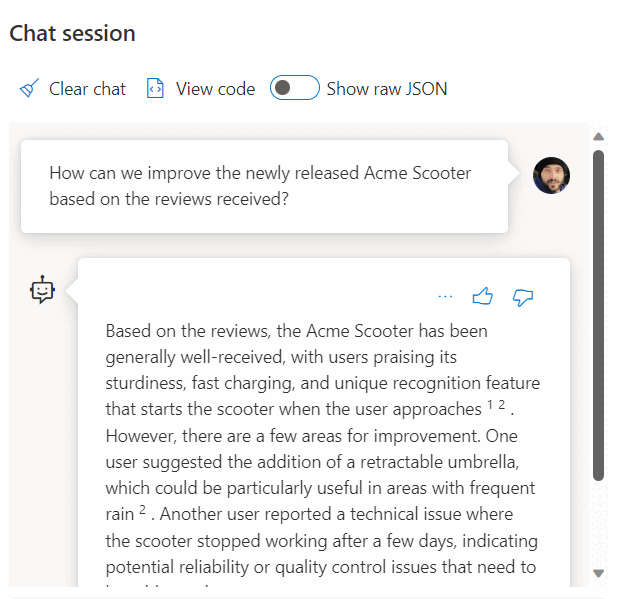
For additional examples on using SQL Database and OpenAI, see the following articles:
- Generate images with Azure OpenAI Service (DALL-E) and Azure SQL Database
- Using OpenAI REST Endpoints with Azure SQL Database
Vector examples
The dedicated vector data type allows for efficient and optimized storing of vector data. It comes with a set of functions to help developers streamline vector and similarity search implementation. You can calculate the distance between two vectors in one line of code by using the VECTOR_DISTANCE function. For more information and examples, see Vector search and vector indexes in the SQL Database Engine.
For example:
CREATE TABLE [dbo].[wikipedia_articles_embeddings_titles_vector]
(
    [article_id] [int] NOT NULL,
    [embedding] [vector](1536) NOT NULL,
)
GO

SELECT TOP(10)
    *
FROM
    [dbo].[wikipedia_articles_embeddings_titles_vector]
ORDER BY
    VECTOR_DISTANCE('cosine', @my_reference_vector, embedding)
Azure AI Search
Implement RAG patterns with Azure SQL Database and Azure AI Search. You can run supported chat models on data stored in Azure SQL Database, without having to train or fine-tune models, thanks to the integration of Azure AI Search with Azure OpenAI and Azure SQL Database. By running models on your data, you can chat on top of, and analyze, your data with greater accuracy and speed.
- Azure OpenAI on your data
- Retrieval Augmented Generation (RAG) in Azure AI Search
- Vector Search with Azure SQL Database and Azure AI Search
Intelligent applications
You can use Azure SQL Database to build intelligent applications that include AI features, such as recommenders and Retrieval Augmented Generation (RAG), as the following diagram demonstrates:
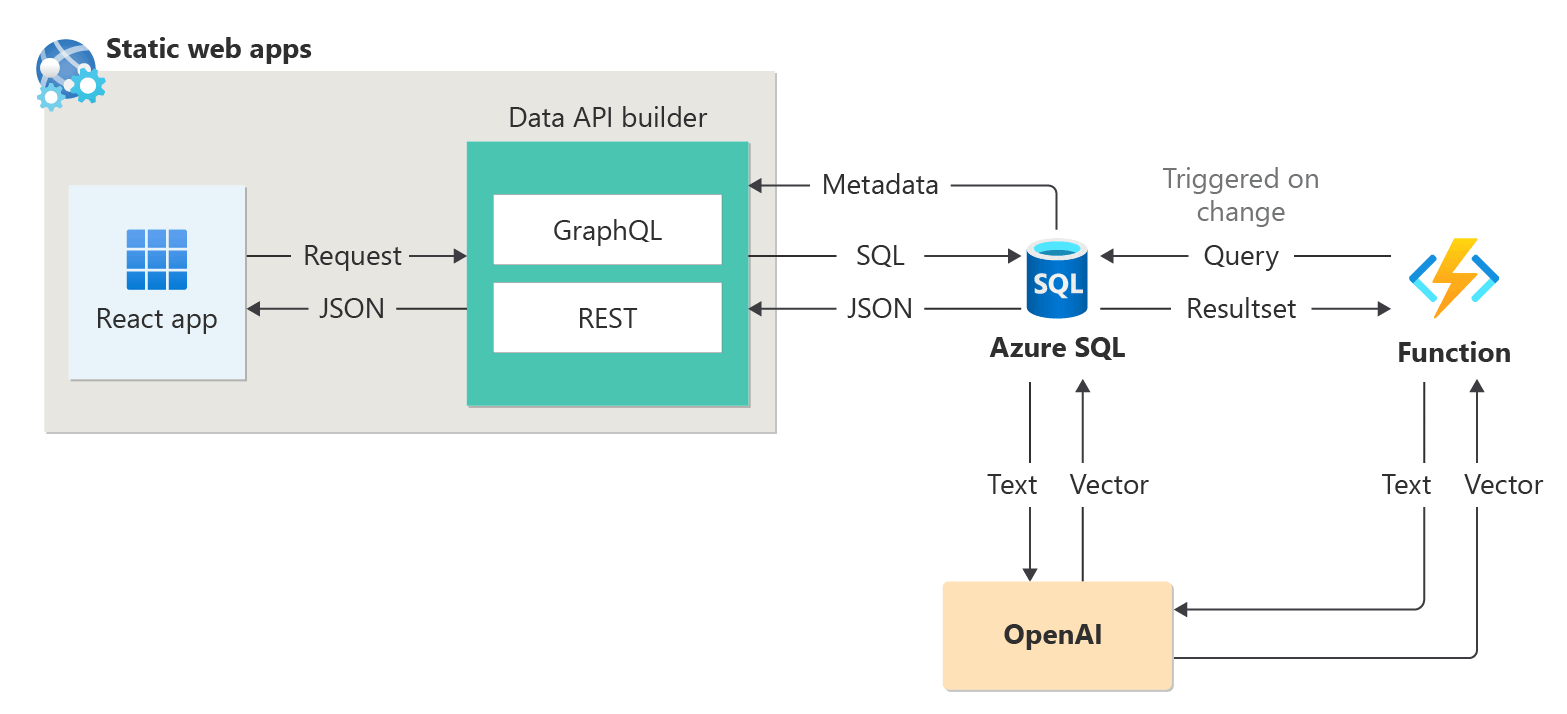
For an end-to-end sample to build an AI-enabled application using sessions abstract as a sample dataset, see:
- How I built a session recommender in 1 hour using OpenAI.
- Using Retrieval Augmented Generation to build a conference session assistant.
For more details on intelligent applications, see:
LangChain integration
LangChain is a well-known framework for developing applications powered by language models. For examples that show how LangChain can be used to create a chatbot on your own data, see:
- langchain-sqlserver PyPI package
A few samples on using Azure SQL with LangChain:
End-to-end examples:
- Build a chatbot on your own data in 1 hour with Azure SQL, Langchain, and Chainlit: Build a chatbot using the RAG pattern on your own data using Langchain for orchestrating LLM calls and Chainlit for the UI.
Semantic Kernel integration
Semantic Kernel is an open-source SDK that you can use to easily build agents that call your existing code. As a highly extensible SDK, you can use Semantic Kernel with models from OpenAI, Azure OpenAI, Hugging Face, and more. By combining your existing C#, Python, and Java code with these models, you can build agents that answer questions and automate processes.
An example that shows how easily Semantic Kernel helps you build an AI-enabled solution is here:
- The ultimate chatbot?: Build a chatbot on your own data using both NL2SQL and RAG patterns for the ultimate user experience.
Microsoft Copilot skills in Azure SQL Database
Microsoft Copilot in Azure SQL Database (preview) is a set of AI-assisted experiences designed to streamline the design, operation, optimization, and health of Azure SQL Database-driven applications.
Copilot provides relevant answers to user questions, simplifying database management by using database context, documentation, dynamic management views, Query Store, and other knowledge sources. For example:
- Database administrators can independently manage databases and resolve issues, or learn more about the performance and capabilities of your database.
- Developers can ask questions about their data as they would in text or conversation to generate a T-SQL query. Developers can also learn to write queries faster through detailed explanations of the generated query.
Note
Microsoft Copilot skills in Azure SQL Database are currently in preview for a limited number of early adopters. To sign up for this program, visit Request Access to Copilot in Azure SQL Database: Preview.
Microsoft Copilot in Fabric SQL database (preview)
Copilot for SQL database in Microsoft Fabric includes integrated AI assistance with the following features:
Code completion: Start writing T-SQL in the SQL query editor and Copilot automatically generates a code suggestion to help complete your query. Press Tab to accept the code suggestion or keep typing to ignore it.
Quick actions: In the ribbon of the SQL query editor, the Fix and Explain options are quick actions. Highlight a SQL query and select one of the quick action buttons to perform the selected action on your query.
Fix: Copilot fixes errors in your code as error messages arise. Error scenarios can include incorrect or unsupported T-SQL code, wrong spellings, and more. Copilot also provides comments that explain the changes and suggest SQL best practices.
Explain: Copilot provides natural language explanations of your SQL query and database schema in comments format.
Chat pane: Use the chat pane to ask questions to Copilot through natural language. Copilot responds with a generated SQL query or natural language based on the question asked.
Natural Language to SQL: Generate T-SQL code from plain text requests, and get suggestions of questions to ask to accelerate your workflow.
Document-based Q&A: Ask Copilot questions about general SQL database capabilities, and it responds in natural language. Copilot also helps find documentation related to your request.
Copilot for SQL database uses table and view names, column names, primary key, and foreign key metadata to generate T-SQL code. Copilot for SQL database doesn't use data in tables to generate T-SQL suggestions.