Microsoft Edge | Microsoft Edge development
Developing and testing features or extensions for Microsoft Edge

This browser is no longer supported.
Upgrade to Microsoft Edge to take advantage of the latest features, security updates, and technical support.
' cx='32' cy='32' r='32' /%3E%3Ctext x='50%25' y='55%25' dominant-baseline='middle' text-anchor='middle' fill='%23FFF' %3EI%3C/text%3E%3C/svg%3E)
Hi all,
since quite a time, I recieve a message from my anit-malware system that a malware was found in the Folder C:\Users[username]\AppData\Local\Microsoft\Windows\INetCache\IE[subfolder].
What is this folder for?
And how can malware be in this folder?
I tried to re-setup the device and deleted the profile, but this doesn't seem to work.
Does anyone had the same problem or knows how to solve this problem?
icschnue
Developing and testing features or extensions for Microsoft Edge
' cx='32' cy='32' r='32' /%3E%3Ctext x='50%25' y='55%25' dominant-baseline='middle' text-anchor='middle' fill='%23FFF' %3EA%3C/text%3E%3C/svg%3E)
Hi @icschnue ,
As far as I know, the AppData\Local\Microsoft\Windows\INetCache folder is used to store temporary Internet files for IE, such as copies of web pages, images, etc. You can view this folder like this screenshot.?platform=QnA But I didn't find the IE subfolder you mentioned. If possible, could you provide more details? For example, what version of the Windows OS are you using, and have you installed any third-party software recently?
In addition, you could try to delete browsering history, click the Delete button marked in yellow in the image, make sure the 'Temporary Internet files and websites files' option is checked, then click delete.
Hi @Anonymous
Sorry for my late answer...
But thank you for your response!
So the folder "AppData" is a hidden folder, maybe that's the reason, why you can't see the folder I mentioned. If you enable the hidden files you should see the folder.
I use Windows 10 and I didn't install any third-party software recently. I also tried to delete the search history, delete the files in the mentioned folder and also re-setup the whole device.
icschnue
Hi @icschnue ,
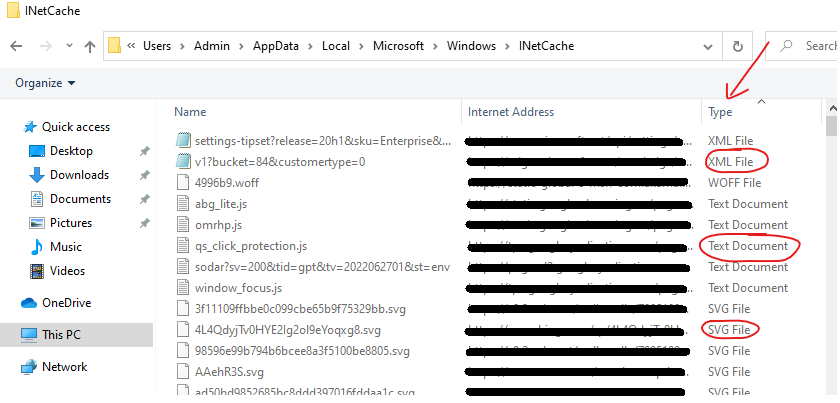
Well, I know AppData is a hidden folder, I mean I can't find the IE subfolder you mentioned. As shown in the screenshot below, this INetCache folder is full of files(Type => jpg,xml,javascript and others), and there is no such structure as subfolders(Type=> File folder).
' cx='32' cy='32' r='32' /%3E%3Ctext x='50%25' y='55%25' dominant-baseline='middle' text-anchor='middle' fill='%23FFF' %3EAE%3C/text%3E%3C/svg%3E)
Not 100% sure, but it appears the virus creates the \IE... folder and adds the contents. If you delete the \IE folder, it gets re-created. A Windows Defender quick scan does not detect the virus.
