' cx='32' cy='32' r='32' /%3E%3Ctext x='50%25' y='55%25' dominant-baseline='middle' text-anchor='middle' fill='%23FFF' %3EMM%3C/text%3E%3C/svg%3E)
' cx='32' cy='32' r='32' /%3E%3Ctext x='50%25' y='55%25' dominant-baseline='middle' text-anchor='middle' fill='%23FFF' %3ERM%3C/text%3E%3C/svg%3E)
' cx='32' cy='32' r='32' /%3E%3Ctext x='50%25' y='55%25' dominant-baseline='middle' text-anchor='middle' fill='%23FFF' %3EMP%3C/text%3E%3C/svg%3E)
To buy more parallel jobs:
- Billing must be set up for your organization
- You need to be a member of the Project Collection Administrators group.
Buy parallel jobs
Buy more parallel jobs within your organization settings:
Sign in to your organization (https://dev.azure.com/{yourorganization}).
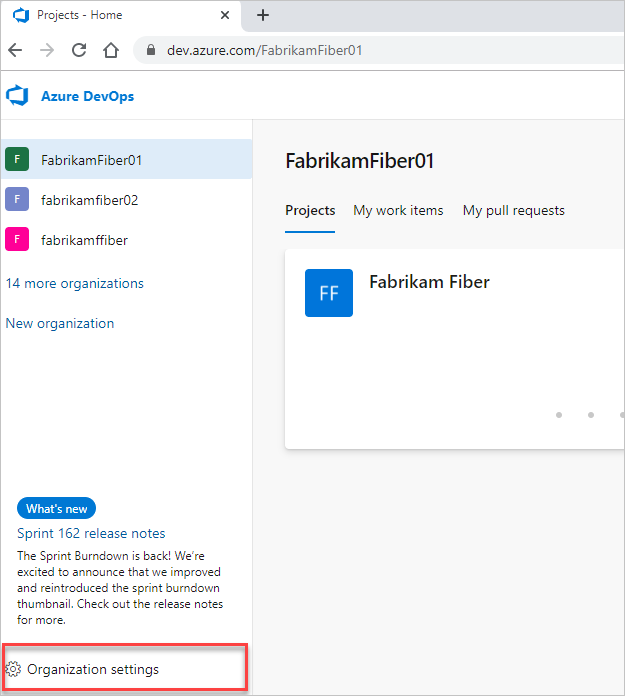
Select  Organization settings.
Select Parallel jobs under Pipelines, and then select either Purchase parallel jobs or Change for Microsoft-hosted jobs or Change for self-hosted jobs.
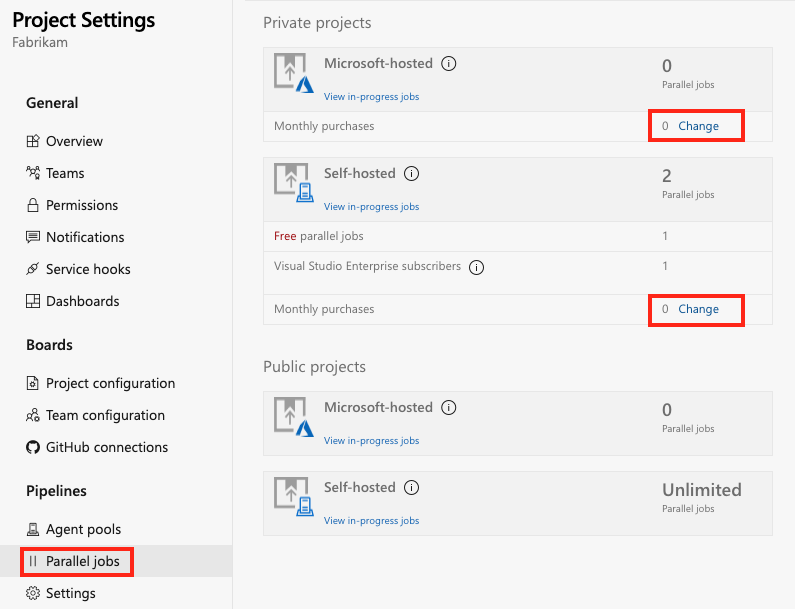
Enter your desired amount, and then Save.
It might take up to 30 minutes for your parallel jobs to become available to use.
For pricing cost per parallel job, see the Azure DevOps pricing page.
How do I change the quantity of parallel jobs for my organization?
Sign in to your organization (https://dev.azure.com/{yourorganization}).
Select Organization settings.
Select Parallel jobs under Pipelines, and then select either Purchase parallel jobs or Change for Microsoft-hosted jobs or Change for self-hosted jobs.
Enter a lesser or greater quantity of Microsoft-hosted or self-hosted jobs, and then select Save.
It might take up to 30 minutes for the new number of parallel jobs to become active.
How is a parallel job consumed in DevOps Services?
Consider an organization that has only one Microsoft-hosted parallel job. This job allows users in that organization to collectively run only one job at a time. When more jobs are triggered, they're queued until previous jobs finish.
If you use release or YAML pipelines, then a run consumes a parallel job only when it's being actively deployed to a stage. While the release is waiting for an approval or a manual intervention, it doesn't consume a parallel job.
When you run a server job or deploy to a deployment group using release pipelines, you don't consume any parallel jobs.

- FabrikamFiber CI Build 102 (main branch) starts first.
- Deployment of FabrikamFiber Release 11 gets triggered by completion of FabrikamFiber CI Build 102.
- FabrikamFiber CI Build 101 (feature branch) is triggered. The build can't start yet because Release 11's deployment is active. So the build stays queued.
- Release 11 waits for approvals. Fabrikam CI Build 101 starts because a release that's waiting for approvals doesn't consume a parallel job.
- Release 11 is approved. It resumes only after Fabrikam CI Build 101 is completed.
If the above response helps answer your question, remember to "Accept Answer" so that others in the community facing similar issues can easily find the solution. Your contribution is highly appreciated.
hth
Marcin