Share via

Reach error statement in a header file when I shouldn't

Kane, Derek 0 Reputation points
2026-03-04T15:28:09.6+00:00

When I include cccl/atomic in a .cu file on VisualStudio 2022, CUDA Toolkit 13.1, I get an error related to requiring C++ 17:

#error: libcu++ requires at least C++ 17. Define CCCL_IGNORE_DEPRECATED_CPP_DIALECT to suppress this message.

Screenshot 2026-03-04 100859

The error comes from these lines in the cpp_dialect.hpp file from Nvidia:

User's image

I have enabled C++17 in the project, and when I hover over “_CCCL_STD_VER”, I see that it is defined to be “2017”:
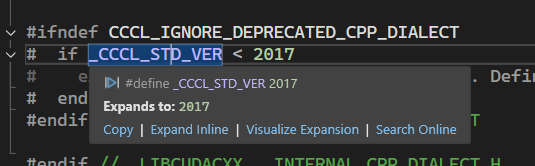
User's image

So I should not be reaching the error statement. Does anyone have any suggestions for whether this is a VisualStudio problem or a CUDA/nvcc problem, and how I might resolve it?

Thank you,

Derek

Developer technologies | Visual Studio | Other

A family of Microsoft suites of integrated development tools for building applications for Windows, the web, mobile devices and many other platforms. Miscellaneous topics that do not fit into specific categories.


1 answer

Sort by: Most helpful
  1. Baani Silva 5 Reputation points
    2026-03-23T10:23:36.2433333+00:00

    This is usually not a Visual Studio issue, it’s a mismatch between what MSVC thinks the standard is and what NVCC is actually using.

    Even if you enabled C++17 in the project, NVCC often still defaults to an older standard unless you explicitly pass it.

    A couple of things to check:

    1. Make sure NVCC is using C++17 In your CUDA project settings:
    • CUDA C/C++ → Language → C++ Language Standard → set it to C++17

    OR manually add:

    -std=c++17

    1. Host compiler flags Sometimes MSVC is set correctly, but NVCC’s host compiler isn’t picking it up. You can force it with:

    -Xcompiler "/std:c++17"

    1. IntelliSense vs actual compile The _CCCL_STD_VER showing 2017 in hover is IntelliSense, not necessarily what NVCC uses during compilation. The actual compile step can still be using an older dialect.
    2. Quick workaround (not ideal) You can define:

    CCCL_IGNORE_DEPRECATED_CPP_DIALECT

    but that just suppresses the error, it doesn’t fix the underlying mismatch.

    0 comments No comments

Your answer

Answers can be marked as 'Accepted' by the question author and 'Recommended' by moderators, which helps users know the answer solved the author's problem.