Bemærk
Adgang til denne side kræver godkendelse. Du kan prøve at logge på eller ændre mapper.
Adgang til denne side kræver godkendelse. Du kan prøve at ændre mapper.
With a GitHub account, you get full GitHub support from within the Visual Studio IDE to both manage your code and collaborate with others on development projects.
If you don't already have a GitHub account, here's how to create one.
Open https://github.com in a web browser, and then select Sign up.

Fill out the online form, and then select Create account.

Verify your account by solving a puzzle. Select Visual puzzle or Audio puzzle to do so, and then follow the prompts.
After you verify your account, select the Create account button.
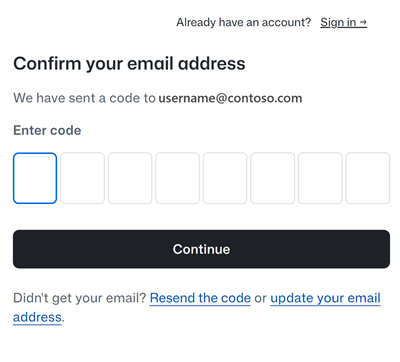
Next, GitHub sends a launch code to your email address. Type that launch code in the Enter code boxes, and then select Continue.
After you sign in, GitHub opens a personalized page in your browser.

Congratulations! You've successfully created your GitHub account.
Multiple GitHub accounts
You can manage more than one GitHub account in Visual Studio. Different accounts can have access to a different set of repositories and have their own access tokens. For example, if you have an account you use for work or school, you might need to create a separate account for personal use, or the other way around. Or, you might need to manage separate GitHub accounts for different employers to keep access to private assets and tokens clearly separated. See Add GitHub accounts to your keychain. When using version control, you can switch accounts as needed.